

Introduction
A thermal POS printer is one of the most frequently used devices in retail stores, supermarkets, restaurants, cafés, pharmacies, hotels, and other commercial businesses. It works continuously throughout the day to print receipts, invoices, and transaction records, making it an essential part of daily operations. While modern thermal printers are designed for durability and reliable performance, proper maintenance is still necessary to ensure they continue operating efficiently over the long term.
Regular maintenance not only improves print quality but also reduces unexpected downtime, minimizes repair costs, and extends the overall lifespan of the printer. Businesses that invest a little time in preventive care often experience better operational efficiency and fewer interruptions during busy business hours.
Whether you own a small retail shop or manage multiple business locations, maintaining a ZYWELL POS Printer properly can help protect your investment while ensuring consistent printing performance for years.
Why Regular Maintenance Matters
Many businesses only pay attention to their POS printer when a problem occurs. However, preventive maintenance is far more effective than waiting for equipment to fail.
Routine maintenance helps:
- Extend printer lifespan
- Maintain high print quality
- Reduce repair expenses
- Prevent unexpected breakdowns
- Improve operational efficiency
- Increase employee productivity
Simple maintenance habits can significantly improve the long-term reliability of commercial printing equipment.
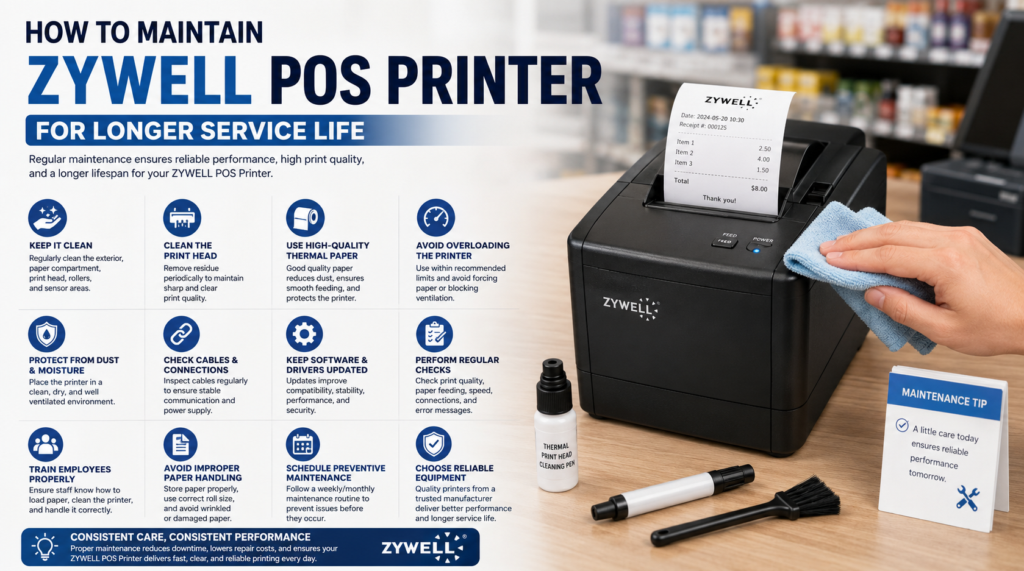
Keep the Printer Clean
Dust is one of the most common causes of printing problems. Retail stores, warehouses, restaurants, and supermarkets often have environments where dust and small paper particles accumulate over time.
Cleaning the printer regularly helps prevent debris from affecting internal components.
Important cleaning areas include:
- Printer exterior
- Paper compartment
- Print head
- Paper feed rollers
- Sensor areas
Using a soft, dry cloth is usually sufficient for cleaning the outside of the printer.
Clean the Thermal Print Head
The print head is the most important component of a thermal POS printer. Over time, residue from thermal paper may build up on the print head, reducing print quality.
Signs that the print head needs cleaning include:
- Faded receipts
- Missing characters
- Uneven printing
- Blurry text
Cleaning the print head periodically helps maintain sharp and professional receipt printing.
Always allow the printer to cool before cleaning internal components.
Use High-Quality Thermal Paper
The quality of thermal paper directly affects printer performance. Low-quality paper often produces excessive dust, which can accumulate inside the printer and shorten its lifespan.
Businesses should choose paper that:
- Produces minimal residue
- Matches printer specifications
- Provides consistent print quality
- Feeds smoothly through the printer
Using recommended thermal paper helps reduce wear on internal components while maintaining clear receipt output.
Avoid Overloading the Printer
Although commercial thermal printers are designed for continuous operation, they should still be used within their recommended workload.
Avoid:
- Forcing oversized paper rolls
- Pulling receipts aggressively
- Operating with damaged paper rolls
- Blocking ventilation openings
Proper daily operation reduces unnecessary stress on the printer’s mechanical components.
Protect the Printer from Dust and Moisture
Environmental conditions play an important role in printer longevity.
Install the printer in an area that is:
- Clean
- Dry
- Well ventilated
- Free from excessive humidity
- Protected from direct sunlight
Moisture and excessive dust can gradually affect electronic components and reduce printing reliability.
Check Cables and Connections
Loose or damaged cables may cause communication problems between the printer and the POS system.
Periodically inspect:
- USB cables
- Ethernet cables
- Power cables
- Serial connections
- Network connections
Secure and undamaged connections help prevent printing interruptions during business hours.
Keep Software and Drivers Updated
Modern POS printers often receive firmware or driver updates that improve compatibility and performance.
Businesses should regularly check for updated software provided by the manufacturer.
Updated drivers may offer:
- Better system compatibility
- Improved stability
- Enhanced performance
- Bug fixes
- Security improvements
Keeping software current helps ensure smooth communication between the printer and the POS system.
Perform Regular Performance Checks
Routine inspections allow businesses to identify small issues before they become major problems.
Regularly check:
- Print clarity
- Paper feeding
- Connection stability
- Printing speed
- Error messages
Early detection allows maintenance to be completed before business operations are affected.
Train Employees on Proper Usage
Many printer problems result from improper handling rather than hardware defects.
Employees should understand how to:
- Load paper correctly
- Remove paper jams safely
- Clean the printer properly
- Power the printer on and off correctly
- Report unusual operating behavior
Proper staff training reduces accidental damage while improving equipment longevity.
Avoid Improper Paper Handling
Paper jams can occur when thermal paper is installed incorrectly or damaged rolls are used.
To reduce paper feeding problems:
- Store paper in a dry location.
- Use properly sized rolls.
- Avoid wrinkled paper.
- Install rolls according to manufacturer instructions.
Correct paper handling improves printing efficiency while reducing unnecessary maintenance.
Schedule Preventive Maintenance
Businesses with heavy printing volumes should establish a routine maintenance schedule rather than waiting for problems to occur.
A preventive maintenance plan may include:
- Weekly cleaning
- Monthly inspections
- Connection testing
- Print quality checks
- Component inspection
Regular servicing keeps the printer operating at peak performance throughout the year.
Choose Reliable Equipment from the Beginning
Long service life starts with selecting a dependable printer. Businesses purchasing equipment from an experienced thermal POS printer manufacturer often benefit from stronger build quality, better technical support, and reliable commercial performance.
Quality equipment generally requires fewer repairs while delivering consistent printing results under demanding business conditions.
Common Mistakes to Avoid
Several maintenance mistakes can shorten the lifespan of a thermal POS printer.
Avoid these common errors:
- Using poor-quality thermal paper
- Ignoring faded print quality
- Cleaning with harsh chemicals
- Blocking ventilation
- Pulling receipts forcefully
- Skipping routine cleaning
- Operating in dusty environments
- Ignoring software updates
Preventing these issues helps maintain efficient printer performance over time.
Final Thoughts
A thermal POS printer is a valuable investment for any retail or hospitality business. Regular cleaning, proper paper selection, routine inspections, and correct operating practices all contribute to longer equipment life and more reliable performance. Preventive maintenance not only protects the printer but also reduces downtime, lowers repair costs, and improves the overall efficiency of business operations.
Whether used in supermarkets, restaurants, hotels, pharmacies, or retail stores, the ZYWELL POS Printer is designed to deliver dependable commercial performance. By following proper maintenance practices and using quality consumables, businesses can maximize the lifespan of their printing equipment while ensuring fast, clear, and consistent receipt printing for years to come.