So, you’re looking for a new laptop but don’t want to spend a fortune? That’s where the Acer Aspire 3 often pops up. It’s advertised as a budget-friendly option, and honestly, who doesn’t like a good deal? In this Acer Aspire 3 laptop review, we’re going to see if this machine actually lives up to the hype. We’ll break down what it’s like to use, from how it looks and feels to how it handles your daily tasks. Let’s figure out if this budget champion is really worth your hard-earned cash.
Key Takeaways
- The Acer Aspire 3 aims for affordability, making it an attractive option for those on a tight budget.
- Its design is functional, though materials might reflect its lower price point.
- Performance is generally suited for basic tasks like web browsing, email, and document editing.
- Expect a standard display that’s adequate for everyday use but not for color-critical work.
- Battery life is usually sufficient for a typical workday, but heavy use will drain it faster.
Acer Aspire 3 Laptop Review: Design and Build Quality
Chassis and Materials
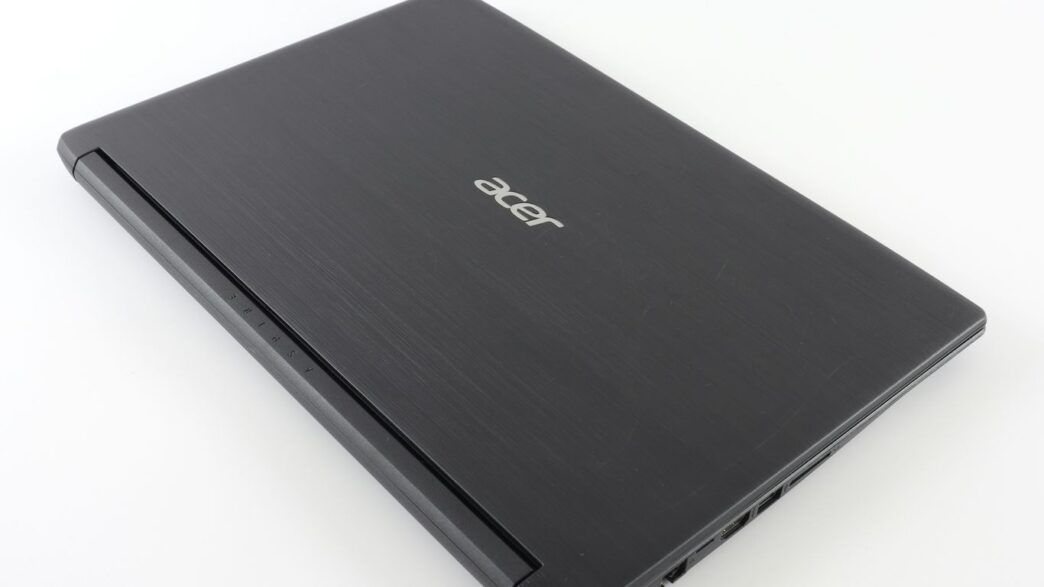
The Acer Aspire 3 doesn’t exactly scream premium, but that’s not really what you’re paying for here. It’s mostly plastic, which is pretty standard for a budget laptop. It feels solid enough though, not too flexy when you press on the lid or keyboard deck. The finish is a matte black that does a decent job of hiding fingerprints, which is a plus. It’s not going to win any awards for its looks, but it feels like it can handle being tossed in a backpack.
Portability and Dimensions
This is where the Aspire 3 does okay, but it’s not going to blow you away. It’s not super thin or light compared to some of the fancier ultrabooks out there. It weighs in at around 3.9 pounds, which is manageable for carrying around, but you’ll definitely feel it after a while. The dimensions are pretty standard for a 15-inch laptop, so it’ll fit in most bags without much fuss. It’s a workhorse, not a fashion statement, so expect it to be a bit chunkier than some competitors.
Aesthetic Appeal
Let’s be honest, the Aspire 3 is designed to be functional, not flashy. The overall look is pretty understated. You get a simple, no-nonsense design with clean lines. The matte black finish is about as exciting as it gets. There are no fancy accents or glowing logos here. It’s a laptop that blends into the background, which might be exactly what some people want. If you’re looking for something that turns heads, you’ll probably need to look elsewhere and spend more money.
Display and Visual Experience
Screen Size and Resolution
The Acer Aspire 3 typically sports a 15.6-inch screen, which is a pretty standard size for most laptops these days. It’s big enough to get some work done without feeling cramped, but not so huge that it becomes a pain to carry around. Most models come with a Full HD (1920 x 1080) resolution. This is good news because it means you’re getting sharp text and clear images, which is what you want for everyday tasks like browsing the web, watching videos, or working on documents. You won’t be seeing individual pixels unless you’re really trying to, and that’s a solid baseline for a budget laptop.
Panel Technology and Refresh Rate
When it comes to the panel itself, the Aspire 3 usually sticks with TN (Twisted Nematic) or sometimes IPS (In-Plane Switching) technology. IPS panels are generally better because they offer wider viewing angles and more consistent colors. If you’re looking at the screen from the side, an IPS display will look much better than a TN panel, which can get washed out. For refresh rates, you’re almost always looking at the standard 60Hz. This is perfectly fine for general use, but if you’re into fast-paced gaming, you might notice that motion isn’t as smooth as on a higher refresh rate screen. For this laptop’s target audience, though, 60Hz is perfectly adequate.
Color Accuracy and Brightness
Let’s be real, budget laptops aren’t usually winning awards for color accuracy. The Aspire 3’s display is generally decent for everyday use, but don’t expect it to be spot-on for professional photo editing or graphic design work right out of the box. Colors might not be as vibrant or as true-to-life as you’d find on more expensive machines. Brightness is usually in the 200-250 nits range. This is okay for indoor use in a moderately lit room, but if you plan on working near a sunny window or outdoors, you might find yourself squinting to see the screen clearly. It’s a functional display, but it’s definitely not the star of the show.
Performance and Everyday Use
When you’re looking at a budget laptop like the Acer Aspire 3, you’re probably not expecting it to chew through demanding tasks. And you’d be right. This machine is built for the basics: web browsing, email, word processing, and maybe some light media consumption. It’s not a powerhouse, but it gets the everyday jobs done without too much fuss.
Processor and Graphics Capabilities
The Aspire 3 typically comes with processors that are fine for everyday computing. Think Intel Core i3 or i5 from a couple of generations back, or equivalent AMD Ryzen chips. These are perfectly capable of handling multiple browser tabs, running office applications, and streaming videos. Don’t expect to play the latest AAA games or do heavy video editing, though. The integrated graphics are basic, suitable for casual games or older titles, but not much more. If you’re curious about how budget laptops handle gaming, you might find the Acer Aspire 3 Spin 14 offers surprising performance for its price point Acer Aspire 3 Spin 14.
RAM and Storage Options
This is where budget laptops can sometimes feel a bit tight. You’ll often find configurations with 8GB of RAM, which is generally the sweet spot for Windows. Some lower-end models might come with 4GB, and honestly, that can feel sluggish pretty quickly with modern software. If you can find a model with 16GB, that’s even better for multitasking. Storage is usually a Solid State Drive (SSD), which is a big plus. Even a smaller SSD (like 256GB) will make the laptop boot up and load apps much faster than an older Hard Disk Drive (HDD). If you find yourself needing more speed, upgrading RAM or switching to a larger SSD is often a possibility on these models, which can make a noticeable difference for a relatively low cost.
Everyday Task Performance
So, what’s it like to actually use the Aspire 3 day-to-day? For tasks like checking emails, browsing websites, writing documents in Google Docs or Microsoft Word, and watching YouTube videos, it performs adequately. You might notice a slight delay when opening multiple applications or switching between them quickly, especially if you have a lot of browser tabs open. It’s not a machine that will win any speed races, but it won’t leave you completely frustrated either. It’s a workhorse for basic productivity and general internet use. If you’re looking for a laptop primarily for schoolwork or basic office tasks, it should serve you well.
Keyboard, Trackpad, and Audio
Typing Comfort and Key Travel
The keyboard on the Acer Aspire 3 is pretty standard for a budget laptop. The keys have a decent amount of travel, which is good, but they feel a little mushy when you press them down. It’s not the worst typing experience I’ve had, but it’s definitely not going to win any awards either. For everyday tasks like typing emails or writing documents, it’s perfectly fine, though. If you’re a heavy typist who spends hours writing code or long-form content, you might find it a bit lacking after a while. There’s a full number pad on the right, which is a nice bonus if you work with spreadsheets a lot.
Trackpad Responsiveness
The trackpad is a decent size and handles basic gestures well. It’s responsive enough for general use, like scrolling through web pages or moving your cursor around. It’s not the most precise thing out there, and sometimes it can feel a little sticky, but for casual use, it gets the job done. If you’re doing anything that requires fine cursor control, like photo editing, you’ll definitely want to plug in a mouse. For basic navigation, though, the Acer Aspire 3 A311-45 touchpad is adequate.
Audio Quality Assessment
Let’s be honest, laptop speakers in this price range are rarely amazing, and the Aspire 3 is no exception. The sound is pretty tinny and lacks any real bass. It’s fine for watching a quick YouTube video or listening to a podcast at a moderate volume, but don’t expect to be blown away. For music or movies, you’re much better off using headphones or external speakers. The headphone jack does provide a clear enough output, so that’s a plus if you plan on using your own audio gear.
Battery Life and Charging
Real-World Battery Endurance
When you’re looking at a budget laptop like the Acer Aspire 3, battery life is a big deal. You don’t want to be tethered to a wall outlet all the time, right? For everyday stuff – like writing emails, browsing the web, or watching a few videos – the Aspire 3 generally holds up pretty well. You can expect it to get you through a good chunk of your workday or a full day of classes without needing a charge. Of course, if you start doing more demanding things, like editing photos or playing games, you’ll see that battery percentage drop a lot faster. It’s not a powerhouse for heavy tasks on the go, but for basic use, it’s quite dependable.
Here’s a rough idea of what you might get:
- Web Browsing & Document Work: 7-9 hours
- Video Streaming: 5-7 hours
- Light Gaming/Photo Editing: 3-4 hours
These numbers can change depending on screen brightness and what other apps are running in the background, so keep that in mind.
Charging Speed and Efficiency
When it does come time to juice up the Acer Aspire 3, it uses a standard barrel-style charger. It’s not the fastest charging system out there, but it gets the job done. You won’t get those super-quick top-ups you see on some more expensive laptops, but plugging it in for an hour or so will give you enough power to finish your tasks or get you home. It takes a couple of hours to go from nearly empty to full, which is pretty typical for this price range. It’s not a major drawback, but it’s something to be aware of if you’re always in a rush.
Connectivity and Ports
When you’re looking at a budget laptop like the Acer Aspire 3, it’s easy to think that the ports and connectivity options might be a bit sparse. You know, to keep the costs down. But honestly, Acer did a pretty decent job here for what you’re paying. It’s not like you’re getting a ton of fancy Thunderbolt ports or anything, but the basics are covered, and that’s what most people need.
Available Ports Selection
The Aspire 3 comes with a decent mix of ports that should handle your everyday peripherals. You’ve got your standard USB ports for plugging in mice, keyboards, or external drives. There’s also an HDMI port, which is super handy if you want to connect it to a bigger monitor or a TV for presentations or just watching something on a larger screen. Plus, a headphone jack is still a must-have for many, whether you’re listening to music or joining a video call.
Here’s a quick rundown of what you can expect:
- USB Ports: Usually a mix of USB 3.2 Gen 1 and USB 2.0. The faster ones are great for transferring files quickly or connecting devices that need more bandwidth.
- HDMI Output: For connecting to external displays.
- Headphone/Microphone Combo Jack: For your audio needs.
- Ethernet Port (RJ-45): Some models include this, which is nice for a stable wired internet connection if Wi-Fi is being flaky.
- DC-in Jack: For the power adapter.
It’s important to check the specific configuration you’re looking at, as port selection can sometimes vary slightly between different Aspire 3 models.
Wireless Connectivity Standards
On the wireless front, the Acer Aspire 3 generally keeps up with the times. Most configurations will come with Wi-Fi that’s at least Wi-Fi 5 (802.11ac), and newer versions might even sport Wi-Fi 6 (802.11ax). Wi-Fi 6 is a nice upgrade if your router supports it, offering faster speeds and better performance, especially in crowded wireless environments. Bluetooth is also included, so connecting wireless headphones, speakers, or other accessories is no problem at all. This means you can ditch some of those cables if you want to keep your setup looking cleaner.
Value Proposition and Target Audience

Affordability and Pricing
Let’s be real, most people looking at the Acer Aspire 3 aren’t trying to break the bank. This laptop sits squarely in the budget category, and that’s its main selling point. You’re not getting premium materials or top-tier performance here, but you are getting a functional laptop for a price that’s hard to beat. It’s the kind of machine you might grab if your old one finally gave up the ghost and you need something to get you through the next year or two without spending a fortune. Think of it as a reliable workhorse for basic tasks, not a powerhouse for demanding applications.
Who is the Acer Aspire 3 For?
So, who exactly should be eyeing this laptop? Honestly, it’s a pretty broad group, but here are the main folks who’ll likely get the most out of it:
- Students: For taking notes, writing papers, doing research online, and maybe streaming lectures. It’s light enough to carry around campus too.
- Home Users: If you just need a computer for browsing the web, checking email, online banking, and maybe watching some YouTube videos. It’s a solid second computer for the household.
- Basic Office Work: For tasks like word processing, spreadsheets, and managing emails. If your job doesn’t require heavy software, this could be a good fit.
- First-Time Laptop Buyers: For someone who’s never owned a laptop before and wants to dip their toes in without a big financial commitment.
It’s really for anyone who needs a computer to do the everyday stuff without fuss. If you’re looking to play the latest games or edit high-resolution video, you’ll definitely want to look elsewhere.
Comparison to Competitors
When you’re in this price range, you’re often looking at a few different types of machines. You’ve got other budget Windows laptops, and then you have Chromebooks. The Aspire 3’s biggest advantage over many Chromebooks is its ability to run full Windows applications. If you need specific software that only runs on Windows, or you’re just more comfortable with the Windows environment, the Aspire 3 makes more sense. Chromebooks can be cheaper and simpler, but they’re limited to web apps and Android apps. On the other hand, some other budget Windows laptops might offer slightly better build quality or a bit more processing power for a similar price, but you’ll have to shop around and compare specs carefully. The Aspire 3 often hits a sweet spot between cost, basic functionality, and the familiarity of Windows.
So, Is the Acer Aspire 3 Worth It?
Alright, let’s wrap this up. The Acer Aspire 3 isn’t trying to be the flashiest laptop out there, and honestly, that’s kind of its charm. For the price, you’re getting a machine that handles everyday tasks without a fuss. Think browsing the web, writing emails, maybe streaming a show or two. It’s not going to win any awards for speed or fancy features, but it gets the job done. If you’re on a tight budget and just need a reliable computer for basic stuff, the Aspire 3 is definitely worth a look. Just don’t expect it to run the latest games or handle heavy video editing. It’s a solid, no-frills option for everyday use.
Frequently Asked Questions
What makes the Acer Aspire 3 a good budget laptop?
The Acer Aspire 3 is often praised for offering a good mix of features without costing too much. It usually comes with decent processors for everyday tasks like browsing the web, doing homework, or watching videos. Plus, it’s built to be affordable, making it a great choice if you don’t want to spend a lot of money.
Can I play games on the Acer Aspire 3?
While the Acer Aspire 3 isn’t designed as a gaming laptop, it can handle very simple or older games. For more demanding games that require better graphics, you might find it struggles. It’s best suited for basic computing tasks rather than heavy gaming.
How is the screen quality on the Acer Aspire 3?
The screen on the Acer Aspire 3 is generally good for its price. It offers clear visuals for everyday use. However, don’t expect super vibrant colors or extremely high detail like you might find on more expensive laptops. It’s perfectly fine for watching movies or working on documents.
Is the Acer Aspire 3 easy to carry around?
Yes, the Acer Aspire 3 is typically designed to be fairly lightweight and not too bulky. This makes it convenient to take with you to school, work, or just move around the house. It balances screen size with portability well for a budget option.
What kind of battery life can I expect from the Acer Aspire 3?
The battery life on the Acer Aspire 3 is usually decent for a budget laptop. You can expect it to last through a good portion of your day for regular tasks like browsing or typing. However, heavy use like watching videos or running demanding programs will drain the battery faster.
Who should buy the Acer Aspire 3?
The Acer Aspire 3 is a great choice for students, people who need a reliable laptop for basic work tasks, or anyone looking for an affordable computer for general home use. If you need a powerful machine for gaming or professional creative work, you might need to look at other options.