Understanding Automation vs. Automatization
Okay, so let’s talk about "automation" and "automatization." You hear these words thrown around a lot, and honestly, they sound pretty similar, right? But there’s a subtle difference, and knowing it can make a big difference in how you talk about and implement these technologies. Think of it like this: automation is the big umbrella term, and automatization is a specific way of getting there.
Defining Automation in Modern English
At its core, automation is all about using technology to do things with less human effort. We’re talking about machines, software, robots – anything that can take over a task or a process that a person used to do. The main goal is to get stuff done more efficiently and reliably. It’s not just about making things faster, though that’s often a nice side effect. It’s also about reducing mistakes, freeing up people to do more interesting work, and generally making systems run smoother.
We see automation everywhere these days. It’s in the factories building cars, it’s in the software that manages your bank account, and it’s even in the smart thermostat controlling your home’s temperature. It’s a huge part of how businesses operate and how we get things done in the 21st century.
The Nuance of Automatization
Now, "automatization" is a bit more specific. It often refers to the process of making something automatic. It’s the act of converting a manual process into an automated one. So, while automation is the state of being automated, automatization is the action of achieving that state. You might say a company is undergoing "automatization" when they are actively implementing new systems to replace manual tasks. It’s the journey, not just the destination.
Key Distinctions in Application
When we look at how these terms are used, the difference becomes clearer. Automation is the broader concept. You can have automated systems for all sorts of things:
- Task Automation: This is the simplest form. Think of automatically sending out a reminder email when a deadline is approaching. It’s a single, repetitive task.
- Process Automation: This involves automating a series of steps that make up a larger process. For example, processing an insurance claim might involve several automated steps, from data entry to verification.
- Intelligent Automation: This is where things get fancy, often involving AI. It’s about automating tasks that require some level of decision-making or learning.
Automatization, on the other hand, is the effort to implement these kinds of automation. A company might invest in automatization projects to improve their customer service or streamline their supply chain. It’s the strategic move to bring automation into play. So, while automation is the technology and its application, automatization is the deliberate act of making it happen.
Core Concepts of Automation
At its heart, automation is about using technology to get things done with less direct human effort. Think of it as handing over repetitive or complex tasks to machines or software so people can focus on other stuff. This shift is fundamentally changing how we work and live. It’s not just about making things faster, though that’s a big part of it. It’s also about improving accuracy, consistency, and even safety in many situations.
Automation as Minimizing Human Input
When we talk about minimizing human input, we mean reducing the need for people to be directly involved in every step of a process. This can range from simple tasks, like automatically sending out a monthly report, to highly complex operations, like a factory assembly line running with minimal oversight. The goal is to create systems that can operate, at least partially, on their own, following programmed instructions or even learning from data.
Applications Across Industries
Automation isn’t confined to one sector; it’s everywhere. You see it in manufacturing, where robots build cars. In offices, software handles customer service inquiries or processes invoices. Even in our homes, smart thermostats and lighting systems are forms of automation. It’s a versatile tool that businesses and individuals are adopting to make their lives easier and more efficient.
Here’s a quick look at where you might find automation:
- Manufacturing: Assembly lines, quality control checks, material handling.
- Business Operations: Data entry, report generation, customer support chatbots, payroll processing.
- Logistics: Warehouse management systems, automated delivery vehicles.
- Healthcare: Robotic surgery, automated lab testing, patient record management.
- Home: Smart thermostats, security systems, automated cleaning devices.
Benefits of Implementing Automation
Why are so many companies jumping on the automation bandwagon? Well, the advantages are pretty compelling. For starters, it often leads to increased productivity. Machines don’t need breaks, and they can perform tasks much faster than humans. This also means fewer errors, as automated systems are programmed to be precise. Plus, by taking over dangerous or tedious jobs, automation can improve worker safety and job satisfaction, allowing people to engage in more meaningful work.
Some key benefits include:
- Increased Efficiency: Tasks are completed faster and with fewer resources.
- Improved Accuracy: Reduced human error leads to more consistent outcomes.
- Cost Reduction: Lower labor costs and fewer mistakes can save money.
- Enhanced Safety: Automating hazardous tasks protects workers.
- Better Resource Allocation: Frees up human employees for higher-value activities.
Types and Examples of Automation
So, we’ve talked about what automation is in general. Now, let’s get into the nitty-gritty of how it actually shows up in the real world. It’s not just one big thing; there are different flavors, each with its own job.
Basic Task Automation
This is probably the simplest kind. Think about those repetitive, everyday tasks that nobody really wants to do. Basic automation takes those and handles them. It’s all about digitizing and speeding up things like sending out invoices, getting documents approved, or even onboarding new employees with standard paperwork. The main goal here is to get rid of the tedious stuff so people can focus on more interesting work. It cuts down on mistakes and makes things move a lot faster.
Process Automation Explained
Process automation goes a bit deeper than just single tasks. It looks at a whole series of steps that make up a business process and figures out how to automate that sequence. This could involve multiple systems talking to each other or a workflow that moves information from one stage to the next without a person having to push a button. It’s about making entire workflows smoother and more efficient. For example, imagine a customer service request that automatically gets logged, assigned to the right team, and triggers follow-up emails – that’s process automation in action.
Intelligent Automation and AI Integration
This is where things get really interesting, and it’s the kind of automation you hear about a lot these days. Intelligent automation uses artificial intelligence (AI) and machine learning to do more than just follow pre-set rules. It can actually learn, adapt, and make decisions. Think about chatbots that can understand what you’re asking and give helpful answers, or systems that can analyze large amounts of data to spot trends or potential problems. It’s like giving automation a brain. This type of automation can handle more complex situations and even improve its own performance over time.
Automation in Industrial and Business Settings
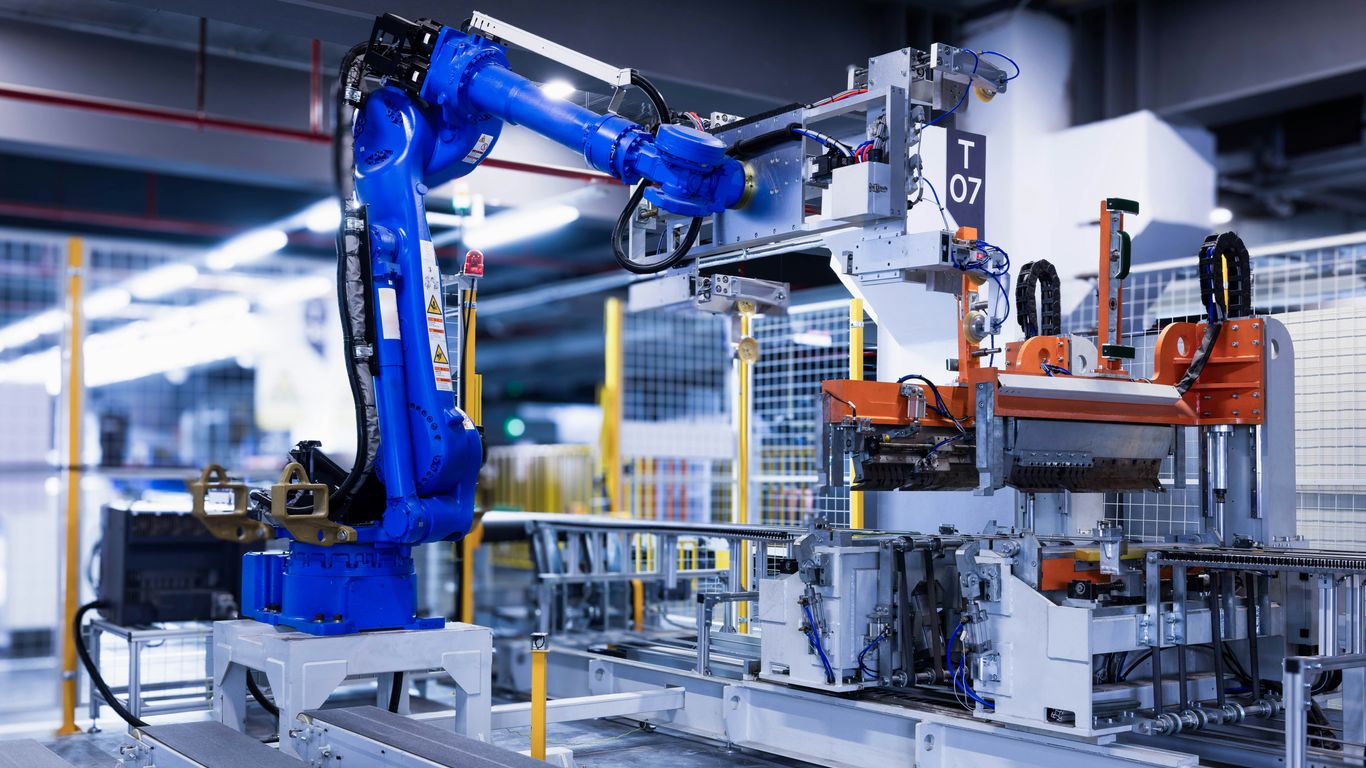
Industrial Automation for Efficiency and Safety
When we talk about factories and big production lines, that’s where industrial automation really shines. Think about those huge machines that stamp out car parts or robots that carefully place components on circuit boards. The main goal here is to get more done, faster, and with fewer mistakes, all while keeping people out of harm’s way. It’s about using technology to handle tasks that are either too repetitive, too dangerous, or just too physically demanding for humans. This could be anything from moving heavy materials around a warehouse with automated cranes to using computer-controlled machines for precise cutting and shaping. It’s not just about speed, though; it’s also about making sure every product is made to the same standard, every single time. This consistency is a huge win for quality control.
Here are some common ways industrial automation shows up:
- Automated Storage and Retrieval Systems (ASRS): Think of those massive warehouses where robots zip around, picking and placing goods without a human in sight.
- Computer Numerical Control (CNC) Machines: These machines follow precise computer instructions to shape materials, from metal to wood.
- Flexible Manufacturing Systems (FMS): These are more adaptable systems that can switch between making different products without a complete overhaul.
Computer Automation in Operations
Computer automation is a bit broader and really refers to using software, electronics, and programmed devices to run processes. This happens everywhere, not just on the factory floor. It’s how your bank’s systems process transactions, how cloud services manage data, or how software automatically sends out invoices. It’s about making digital workflows smooth and efficient. Instead of someone manually clicking through a dozen steps in a program, a script or a dedicated automation tool handles it. This frees up office workers from tedious digital chores so they can focus on more complex problems or creative tasks. It’s the backbone of many modern business operations, making sure things run like clockwork behind the scenes.
Business Automation for Streamlined Workflows
Business automation takes the idea of computer automation and applies it specifically to how companies operate. It’s all about making business processes run more smoothly and with less human effort. Imagine automatically sending follow-up emails after a customer makes a purchase, or having software manage employee onboarding paperwork. These are all examples of business automation. The benefits are pretty clear: less time spent on repetitive tasks, fewer errors creeping in, and a general increase in how much work can get done. It helps businesses scale up without needing to hire proportionally more people for every new task. It’s a key part of making a company more agile and competitive in today’s fast-paced world.
Automation vs. Orchestration: A Deeper Dive
Okay, so we’ve talked a lot about automation, which is basically getting a computer or a piece of software to do a specific, repetitive task for you. Think of it like setting up a really good coffee maker that grinds the beans, brews, and pours all by itself. You tell it what to do, and it just does it, every single time. But what happens when you have a whole bunch of these automated tasks that need to work together, in a specific order, to get a bigger job done? That’s where orchestration comes in.
Scope and Complexity Differences
Automation is usually about one thing. You want to send an email when a form is submitted, or maybe back up a file every night. It’s focused and straightforward. Orchestration, on the other hand, is like being the conductor of a symphony. It’s not just about one instrument playing its part; it’s about making sure all the instruments, all the different automated tasks, play together in harmony, at the right time, to create the whole piece of music. It handles the complex connections between different automated steps.
Here’s a quick look at how they differ:
- Automation: Focuses on a single, repeatable task.
- Orchestration: Manages and coordinates multiple automated tasks to complete a larger workflow.
- Automation: Simpler, task-specific setup.
- Orchestration: Deals with interdependencies and sequences across various tasks and systems.
Goals of Automation and Orchestration
When you automate something, the main goal is usually to just get that one task done without you having to lift a finger, and to do it accurately and quickly. It’s about saving time on the small, tedious stuff. For example, automatically sending a welcome email to new subscribers is a classic automation win. It frees you up from that manual step.
Orchestration takes it a step further. Its goal is to make a whole series of actions run smoothly and efficiently. Imagine deploying a new piece of software. You might have automated steps for checking the code, running tests, packaging it up, and then sending it to the servers. Orchestration makes sure all those individual automated steps happen in the right order, and if one fails, it knows what to do next. It’s about making complex processes work.
When to Employ Each Approach
So, when do you use which? It really comes down to what you’re trying to achieve.
- Use Automation for:
- Use Orchestration for:
The Evolution and History of Automation
It’s easy to think of automation as a super modern thing, all robots and AI, but the idea of machines doing work for us goes way back. Seriously, think about it. We’ve been trying to make tasks easier with tools for ages.
Early Innovations in Automated Processes
One of the earliest examples we can point to is from way back in 1785. Oliver Evans built an automatic flour mill. This wasn’t just a little helper; it was designed to run continuously without people having to do much at all. It was a pretty big deal for its time, showing that complex industrial processes could be handled by machines.
The Coining of the Term ‘Automation’
While the idea of automation is old, the word itself is much newer. It wasn’t until 1946 that the term ‘automation’ was actually used. An engineer named D.S. Harder, working at Ford Motors, came up with it. He used it to describe how they were using more machines on the production lines to speed things up and make them more consistent. It really took off in the car industry, which was all about mass production.
Development of Autonomous Robots
Fast forward a bit, and things started getting even more sophisticated. In 1948, William Grey Walter created what are considered the first autonomous robots. These weren’t just machines following a set path; they had a bit more independence. This was a huge step towards the kind of intelligent machines we see today, capable of making some decisions on their own and interacting with their environment in more complex ways.
Strategic Implementation of Automation
So, you’ve decided automation is the way to go. That’s great! But just jumping in without a plan can lead to a mess. Think of it like trying to build IKEA furniture without the instructions – you might end up with something that looks sort of like a bookshelf, but it probably won’t hold books very well. Getting automation right means thinking strategically about how it fits into your business.
Integrating Automation into Digital Transformation
Digital transformation is a big buzzword, and automation is a huge part of it. It’s not just about slapping some software onto an old process. It’s about rethinking how your business operates from the ground up, using technology to make things better. Automation helps here by taking over repetitive tasks, freeing up your people to do more interesting work. It also helps connect different parts of your business that might have been working in silos before. When automation is part of your digital transformation plan, it helps make sure all your new tech works together smoothly. This means less wasted time and fewer errors.
People-Centric Automation Strategies
It’s easy to get caught up in the technology and forget about the people. But automation shouldn’t be about replacing everyone. It should be about making their jobs easier and more productive. When you’re planning automation, think about how it will affect your employees. Will it take away tedious tasks? Will it require new skills? Providing training and involving your team in the process makes a big difference. People are more likely to accept and use new systems if they understand why they’re being put in place and how they can benefit.
Here are a few steps to consider:
- Identify the right tasks: Look for tasks that are done over and over, don’t require much complex thinking, and often lead to mistakes. Things like sending out standard reports or processing simple invoices are good candidates.
- Start small: Don’t try to automate everything at once. Pick one or two processes that will give you a quick win. This builds confidence and shows the value of automation early on.
- Involve your team: Talk to the people who actually do the work. They often have the best ideas about what can be automated and how it can be done effectively. Their input is gold.
- Plan for change: Think about how the automated process will work and what new roles or responsibilities might be needed. Make sure your team has the training they need to adapt.
Leveraging Automation for Competitive Advantage
Companies that use automation well often get ahead of their competition. Why? Because they can do things faster, cheaper, and with fewer mistakes. Imagine a company that can process customer orders in minutes instead of hours, or one that can identify and fix problems before they even affect customers. That’s a big advantage. Automation helps businesses scale up quickly without needing to hire huge numbers of new staff for every bit of growth. It also allows for more consistent quality, which customers notice and appreciate. By making operations more efficient and responsive, automation helps a business stand out in a crowded market.
Wrapping It Up
So, we’ve gone over what automation is and how it’s showing up everywhere, from factories to our phones. It’s all about using tech to handle tasks that used to need a person, making things faster and often more accurate. While ‘automatization’ isn’t really a word people use in English these days, understanding the core idea of automation is super helpful. Whether it’s a simple task or a whole workflow, automation is changing how we work and live. It’s not just about replacing people, but about letting us focus on the stuff that really needs our brains and creativity. Keep an eye out, because this tech is only going to get more common.