So, you’re setting up a home office and want to keep things tidy? All-in-one computers are pretty neat for that. They cram all the computer bits behind the screen, meaning fewer wires and less mess. It makes your workspace look way cleaner. We’ve looked at a bunch of them to figure out the best all in one for home office setups in 2026. Some are sleek, some are powerful, and some are just good value. Let’s see what made the cut.
Key Takeaways
- The Apple iMac 24-inch (M4) is still a top choice for its design and performance, though a newer model might be coming.
- For Windows users, the Lenovo Yoga AIO 27 offers a stylish design and a sharp screen.
- The Dell OptiPlex 7420 is a solid, affordable option for business and home office use, despite its lower-resolution screen.
- The HP OmniStudio X 31.5 is a strong contender for creative work with its powerful specs and 4K display option.
- The HP Chromebase All-in-One 22 is a budget-friendly pick, especially for those who live in the Google ecosystem.
1. Apple iMac 24-inch (M4)
Alright, let’s talk about the Apple iMac 24-inch with the M4 chip. This machine really does feel like a step up, even if you’re already using a fairly recent Mac. It’s a fantastic all-in-one that just works, blending good looks with serious power.
First off, the display. It’s a 24-inch 4.5K Retina screen, and honestly, it’s gorgeous. Text is super sharp, images pop, and watching videos is a treat. If you’re someone who works near a window or in a bright room, you might want to look into the optional nano-texture glass. It really cuts down on glare, making it much easier on the eyes. The base model is already pretty bright, but this upgrade is worth considering if reflections are a constant annoyance.
Under the hood, the M4 chip is no slouch. It handles everyday tasks like browsing, streaming, and even some light video editing without breaking a sweat. For most people, the 16GB of RAM and 256GB SSD that comes standard is going to be plenty. It’s not really built for hardcore gaming, though; the 60Hz refresh rate means serious gamers should probably look elsewhere.
Here’s a quick rundown of what you get:
- Processor: Apple M4 chip (up to 10-core CPU)
- Display: 24-inch 4.5K Retina
- RAM: 16GB unified memory (starts here, can be upgraded)
- Storage: 256GB SSD (starts here, can be upgraded)
- Webcam: 12MP sensor for better video calls
- Colors: Available in a bunch of fun colors like blue, green, and purple.
It does come in a few more colors than you might expect, which is a nice touch. The webcam got an upgrade too, so you’ll look pretty good on those video calls. While it’s definitely on the pricier side compared to some other all-in-ones, the combination of that stunning display, the quiet yet powerful M4 chip, and the overall design makes it a really pleasant machine to use day in and day out. If you’re looking for a polished, powerful desktop that doesn’t take up a ton of space, this Apple iMac 24-inch M4 is a strong contender.
2. Lenovo Yoga AIO 27
The Lenovo Yoga AIO 27 is a pretty solid option if you’re looking for a Windows-based all-in-one that doesn’t break the bank but still offers a good experience. It really shines with its 1440p display, which makes text look nice and sharp, and it’s great for having multiple windows open side-by-side.
This machine packs an Intel Core Ultra 7 processor, and in my testing, it handled a bunch of browser tabs without breaking a sweat. So, if your daily grind involves a lot of web surfing, Slack, and Spotify, you’ll probably be happy with its performance. It comes with 16GB of RAM, which is usually enough for everyday tasks, but if you’re into heavy-duty creative work like video editing or 3D modeling, you might want to consider upgrading that.
One cool feature is the HDMI input port. This means you can actually use the Yoga AIO 27 as a regular monitor for another device, which is something you don’t see on many all-in-ones. It’s also got a built-in webcam with a privacy shutter, and it supports Windows Hello facial login, which is handy.
However, it’s not really built for serious gaming. While the 120Hz refresh rate makes scrolling look smoother, fast-paced games can get a bit blurry. Also, the webcam’s fixed position means you might get a lot of ceiling in your video calls unless you tilt the whole unit, which is a bit awkward.
Here’s a quick look at some specs:
- Display: 27-inch, 1440p resolution, 120Hz refresh rate
- Processor: Intel Core Ultra 7 255H
- RAM: 16GB (upgradeable)
- Storage: SSD (size varies by configuration)
- Webcam: Built-in with privacy shutter and IR sensor
- Ports: USB-A, USB-C, HDMI (in and out), Ethernet, headphone jack
3. Dell OptiPlex 7420
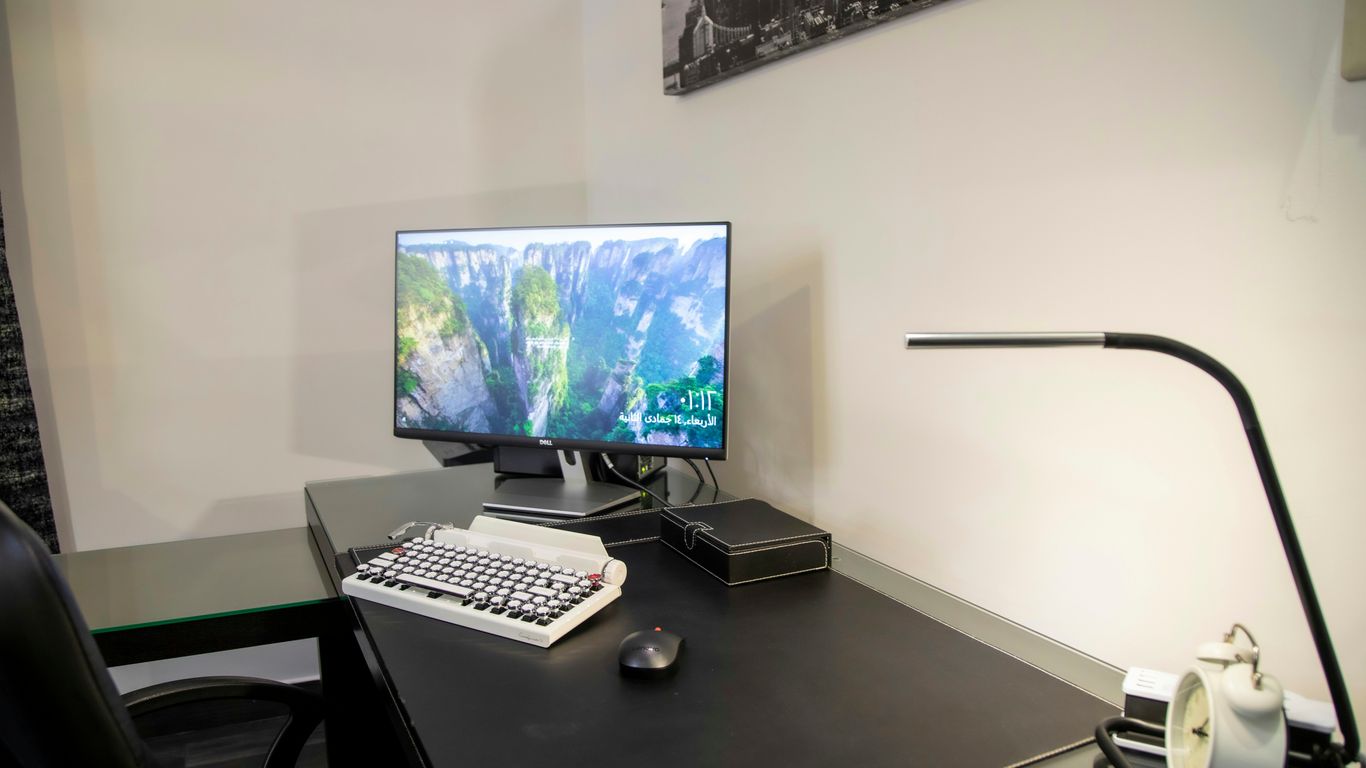
Alright, let’s talk about the Dell OptiPlex 7420. If you’re hunting for a solid all-in-one for your home office, this one is definitely worth a look. It’s built for work, and it shows. You can load it up with some pretty decent hardware, like an Intel Core i9 processor and up to 64GB of RAM. That means it should handle most of your daily tasks without breaking a sweat, whether you’re crunching numbers or juggling a bunch of browser tabs.
One neat little feature is the webcam. It pops right out of the top of the screen when you need it and tucks away when you don’t. It’s a nice touch for privacy, and honestly, it feels a bit more robust than some other built-in webcams I’ve seen.
Now, it’s not perfect. The display is a 1080p resolution, which, let’s be real, is a bit on the low side these days, especially on a screen that’s just under 24 inches. And like many all-in-ones, the port placement can be a bit awkward, but that’s a common trade-off for that clean, integrated look. Still, for the price, the Dell OptiPlex 7420 is a strong contender for anyone needing a reliable work machine that doesn’t take up a ton of space.
4. HP OmniStudio X 31.5
If you’re looking for a Windows-based all-in-one that can really compete with the big players, the HP OmniStudio X 31.5 is a solid contender. It packs a gorgeous 31.5-inch 4K display that makes everything look super sharp, which is a big step up from the 1080p screens you sometimes see on smaller all-in-ones. It’s a pretty stylish machine too, fitting right into a modern home office without looking like a clunky old desktop.
Under the hood, this thing is no slouch. You can get it with processors like the Intel Core Ultra 7 and even an Nvidia RTX 4050 graphics card. This means it’s not just good for everyday stuff like emails and browsing, but it can actually handle some pretty demanding creative work. Think photo editing in Photoshop or even some video editing in Premiere Pro, all while juggling a bunch of browser tabs. It’s a nice change from some other machines that start to chug when you ask them to do too much.
Here’s a quick look at what you can expect:
- Display: 31.5-inch 4K UHD (3840 x 2160)
- Processor: Up to Intel Core Ultra 7
- Graphics: Up to Nvidia RTX 4050
- RAM: Up to 64GB DDR5
- Storage: Dual M.2 PCIe Gen4 slots (up to 2TB SSD each)
While it’s a powerful machine, it’s worth noting that some users have reported a persistent, low fan noise even when it’s not doing much. It’s not loud enough to be a dealbreaker for most, but it’s something to be aware of. Also, while the storage capacity is huge, with up to 1TB SSDs, you might want to check out HP’s product page for the latest configurations and pricing, as options can vary.
5. HP Chromebase All-in-One 22
If you’re looking for a computer that’s pretty much built around the Google Chrome browser, then this HP Chromebase All-in-One 22 might be right up your alley. It’s basically a Chromebook that decided to grow up and become a desktop. This machine is a solid choice, especially if your daily tasks involve a lot of web browsing, using Google Docs, or streaming content. It handles having a bunch of browser tabs open without breaking a sweat, which is pretty neat.
What’s cool is that it manages to pack a decent-sized screen into a footprint that doesn’t take over your entire desk. It looks pretty good too, with some thoughtful design touches that actually make it useful. For the price, it’s a really good deal, making it a strong contender for students, families, or anyone who lives most of their digital life online.
Here’s a quick look at what it offers:
- Display: 21.5-inch FHD (1920 x 1080) touch display
- Processor: Intel Pentium or Core i3 options
- RAM: 8GB or 16GB
- Storage: 128GB or 256GB SSD
- Graphics: Integrated Intel UHD graphics
While the display isn’t the sharpest out there, and the included keyboard and mouse are just okay, the overall package is quite appealing. It’s a budget-friendly option that gets the job done for everyday computing needs.
6. Lenovo ThinkCentre M90a Gen 5
If you’re looking for a solid, no-nonsense all-in-one for your home office or a business setting, the Lenovo ThinkCentre M90a Gen 5 is definitely worth a look. This machine is built with professionals in mind, and it shows. It’s got that desktop-grade power packed into a clean, all-in-one design, which really helps cut down on desk clutter. Plus, it runs pretty quietly, which is a big plus if you’re trying to concentrate.
One of the standout features is its display. While it might not be the absolute highest resolution out there, it’s a spacious and practical screen that can actually double as a standalone monitor if you ever need it to. Our review unit came with a hefty 32GB of memory and a 1TB SSD, making it a really capable machine for getting serious work done. It’s a great option if your current laptop just isn’t cutting it anymore for your home office needs.
Here’s a quick rundown of what makes it a good choice:
- Desktop-level performance: It packs processors that can handle demanding tasks.
- Quiet operation: Designed to keep distractions to a minimum.
- Practical display: A good-sized screen that can also function as a separate monitor.
- Clean design: Reduces cable mess and looks professional.
- Expandable storage and memory: Good for future-proofing your setup.
7. Best Overall
After looking at all the options, the one that really stands out for most home office users is the Apple iMac 24-inch (M4). It just hits that sweet spot between power, design, and ease of use that’s hard to beat.
It’s a machine that looks good on your desk and handles everyday tasks without a hitch. Whether you’re juggling spreadsheets, video calls, or even some light photo editing, it performs smoothly. The display is bright and clear, making long work sessions easier on the eyes. Plus, the built-in speakers are surprisingly decent for an all-in-one.
Here’s why it takes the top spot:
- Performance: The M4 chip is quick and efficient, meaning no lag when you’ve got multiple apps open. It’s great for multitasking.
- Display Quality: The 24-inch Retina display is sharp and has great color accuracy. It makes everything from documents to videos look really good.
- Design: It’s thin, comes in a few nice colors, and has a clean setup with just one cable for power. It really tidies up your workspace.
- User Experience: macOS is generally straightforward, and the integration with other Apple devices is a big plus if you’re already in that ecosystem.
While it might not be the cheapest option, the overall package you get with the iMac 24-inch (M4) makes it a solid investment for a home office that needs a reliable, attractive, and capable computer.
8. Best Budget
Finding a solid all-in-one computer that doesn’t break the bank can feel like a treasure hunt. You want something that looks good on your desk, handles your daily tasks without a hitch, and doesn’t cost a fortune. Luckily, there are some decent options out there if you know where to look.
The HP Chromebase All-in-One 22 often pops up as a strong contender for budget-conscious buyers. It’s not going to win any speed races, but for everyday stuff like browsing the web, checking emails, and using cloud-based apps, it does the job. Plus, its unique swivel screen is a nice touch, letting you switch between portrait and landscape modes easily.
Here’s a quick look at what you might expect from a budget all-in-one:
- Performance: Generally good for basic tasks. Don’t expect to do heavy video editing or run demanding games.
- Display: Usually around 21-22 inches, with decent resolution for everyday use. Colors might not be as vibrant as on pricier models.
- Storage: Often relies on smaller SSDs or cloud storage, so you might need to be mindful of how much you save locally.
- Operating System: Can vary, with ChromeOS being common on budget models for its simplicity and speed with web apps.
While it might not have all the bells and whistles of its more expensive cousins, a good budget all-in-one can still be a perfectly capable machine for many home office needs. It’s all about matching the machine to what you actually do with it.
9. Best Windows 11 All-in-One

If you’re not an Apple fan or just prefer the flexibility of Windows, finding a solid all-in-one can feel a bit trickier. But don’t worry, there are some great options out there that run Windows 11 perfectly. The Lenovo Yoga AIO 27 really stands out in this category. It manages to pack a big, beautiful screen into a desktop that doesn’t take up your whole desk. I’ve spent some time with it, and it’s a machine that just looks good and has some smart design touches that actually make sense for daily use.
When I was testing it, I often had a bunch of browser tabs open – like 20 or more – and it didn’t even break a sweat. Plus, the built-in speakers are surprisingly good for what they are. While all-in-ones can get pretty pricey, this one is a bit of an exception, making it a solid choice for families, students, or anyone who does most of their work in a web browser.
Here’s a quick look at what makes it a strong contender:
- Display: A sharp 27-inch QHD (2560 x 1440) IPS screen with good color accuracy and brightness, making everything look crisp.
- Performance: It can handle everyday tasks and multitasking without slowing down, thanks to its capable processors.
- Design: It has a modern, sleek look that fits well in most home offices, and the included keyboard and mouse feel nice to use.
- Connectivity: Usually offers a good range of ports for your accessories.
It’s not perfect, of course. The RAM is soldered, meaning you can’t upgrade it later, which is a bit of a bummer. And depending on where you are, the most powerful configurations might not be available. Still, for a great Windows 11 all-in-one experience that balances looks and performance, the Lenovo Yoga AIO 27 is hard to beat.
10. Best for Creatives
When you’re deep into creative work, whether it’s graphic design, video editing, or photo manipulation, you need a machine that can keep up without a fuss. For a while now, the Apple iMac has been the go-to for many, but honestly, things have gotten a bit stale on that front, especially with no Pro model in sight for ages. That’s where the HP OmniStudio X 31.5 really shines.
This machine is a serious contender for anyone who needs a powerful Windows 11 all-in-one that doesn’t skimp on display quality or raw performance. It boasts a gorgeous 31.5-inch 4K display that really makes colors pop, which is a big deal when you’re trying to get your projects looking just right. Plus, it packs in up-to-date Intel Core Ultra processors and can be configured with an Nvidia RTX 4050 graphics card. This setup means it can handle pretty demanding tasks, like editing high-resolution photos in Photoshop or cutting together video clips in Premiere Pro, all while you’ve got a bunch of browser tabs open. It’s also surprisingly good value for what you get, which is always a nice bonus.
Here’s a quick look at why it stands out:
- Stunning 4K Display: A 31.5-inch screen with HDR 600 and 95% DCI-P3 coverage means incredible color accuracy and detail. Perfect for visual work.
- Strong Performance: With Intel Core Ultra processors and optional Nvidia RTX 4050 graphics, it’s built for demanding creative applications.
- Ample RAM and Storage: You can get up to 32GB of RAM and 2TB of storage, giving you plenty of room for large project files.
- Good Value: Compared to some other high-end options, the OmniStudio X 31.5 offers a lot of bang for your buck, even if the included keyboard and mouse aren’t the best. You might want to look into a different keyboard and mouse for a better overall experience.
While the Lenovo Yoga AIO 27 is also a solid choice with its own set of impressive features, like the HDMI input that lets you use it as a monitor, the HP OmniStudio X 31.5 often edges it out for pure creative grunt and display brilliance. It’s a machine that feels built for the task, and it’s great to see a Windows option that can truly compete with the best out there for creative professionals.
Wrapping It Up
So, there you have it. Finding the right all-in-one for your home office in 2026 really comes down to what you need it for. Whether you’re leaning towards the slick design and solid performance of an Apple iMac, need something robust for serious work like the Dell OptiPlex, or want a creative powerhouse like the HP OmniStudio, there are some great options out there. Don’t forget about the Lenovo Yoga AIO 27 if Windows is more your speed. It’s all about balancing your budget with the features that will actually make your workday smoother. Take your time, consider what tasks you do most often, and pick the machine that feels like the best fit for your space and your workflow. Happy computing!