So, you’re looking to get a new gaming PC tower in 2026? It can feel a bit overwhelming with all the options out there, right? Prices are all over the place, and figuring out what actually matters for your games can be a puzzle. Whether you’re aiming for super-high frame rates in the latest shooters or just want a solid machine for your favorite RPGs, this guide is here to help. We’ll break down what you need to know to pick the right gaming PC tower without all the confusing tech talk.
Key Takeaways
- Figure out what kind of games you play and what performance you need before you start shopping for a gaming PC tower.
- Don’t forget to think about how much space you have. Some gaming PC towers are pretty big.
- The graphics card is usually the most important part for gaming, but the CPU and RAM also play big roles in how smooth your games run.
- Decide if you want a prebuilt gaming PC tower or if you’d rather put one together yourself.
- Keep an eye on prices and component availability, as things can change quickly in the gaming PC tower market.
Understanding Your Gaming PC Tower Needs
Alright, so you’re looking to snag a new gaming PC tower. That’s awesome! But before you go clicking ‘buy’ on the first shiny box you see, let’s pump the brakes for a sec. We need to figure out what you actually need. It’s not just about getting the most powerful thing out there; it’s about getting the right thing for how you game and what you can afford.
Assessing Your Gaming Performance Requirements
This is where we figure out what kind of games you play and how you like to play them. Are you trying to run the latest AAA titles at super-high resolutions with all the bells and whistles turned on? Or maybe you’re more into competitive esports where every frame counts, and you just need things to be smooth and responsive? Knowing this helps us pick the right guts for your machine. For example, if you’re aiming for 4K gaming with ray tracing, you’ll need a beefier graphics card than someone who’s happy playing at 1080p with medium settings. Think about the games you play most often. Do they need a super-fast processor, or is the graphics card the main star? It’s all about matching the PC’s power to your gaming habits.
Budget Considerations for Your Gaming PC Tower
Let’s talk money. Gaming PCs can range from surprisingly affordable to eye-wateringly expensive. You’ve got to set a budget and stick to it. Remember, the price tag isn’t just for the parts; it often includes the assembly, warranty, and support. If you’re on a tighter budget, you might need to make some compromises, like opting for a slightly less powerful graphics card or a smaller storage drive to start. But don’t worry, many gaming PCs can be upgraded down the line, so you can always add more power later if your budget allows. It’s a good idea to see what you can get for your money by comparing component prices.
Form Factor and Space Constraints
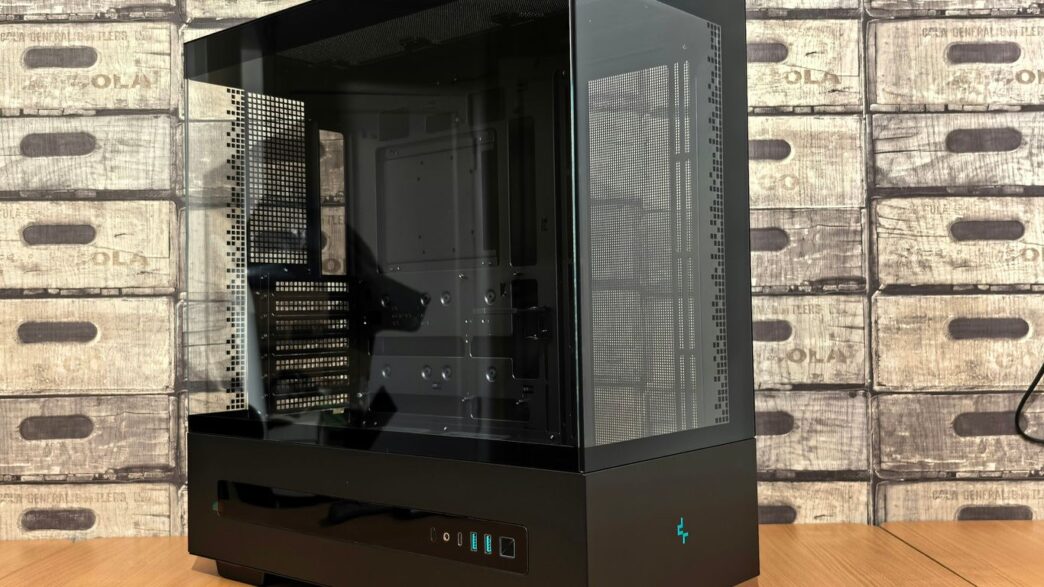
Where is this PC tower going to live? Some towers are massive, like a small fridge, while others are sleek and compact. If you’ve got limited desk space or you just prefer a cleaner look, a smaller form factor might be the way to go. However, bigger cases often mean better airflow and more room for future upgrades. So, think about your available space and whether you plan on moving the PC around often. A huge, heavy tower might not be ideal if you’re constantly relocating it, but it can offer great durability for a stationary setup.
Key Components for a Powerful Gaming PC Tower
Alright, let’s talk about what actually makes a gaming PC tick. Picking the right parts is kind of like choosing your squad for a big raid – you need each member to pull their weight, and some are more important than others.
Choosing the Right CPU for Gaming
The processor, or CPU, is like the brain of your operation. It handles all the calculations that keep your games running smoothly. For gaming in 2026, you’ve got a couple of main players: Intel and AMD. Intel’s latest Core Ultra 200S series is out, but honestly, they’re more about saving power than raw gaming speed. If you’re sticking with Intel, their 13th and 14th Gen chips are still solid choices for gaming. AMD’s Ryzen 9000 series is a bit faster overall, but the real star for gamers is the Ryzen 7 9800X3D. It’s got a ton of cache, which really helps in games. AMD even announced the Ryzen 7 9850X3D at CES 2026, so expect to see that in some high-end builds soon.
Graphics Card Selection: The Heart of Your Gaming PC Tower
This is probably the most important piece for gaming. The graphics card, or GPU, is what renders all those pretty visuals on your screen. Right now, Nvidia’s RTX 50-series cards, like the RTX 5090, 5080, and 5070 Ti, are still the top dogs. They haven’t announced anything to top them yet. On the AMD side, the RX 9070 XT and RX 9070 offer good bang for your buck, especially if you need 16GB of VRAM. Your choice here really depends on the resolution you plan to play at – 1080p is fine with mid-range cards, but 1440p or 4K will demand something more powerful.
RAM and Storage: Speed and Capacity
RAM, or random access memory, is where your PC temporarily stores data it’s actively using. More RAM means your PC can handle more tasks at once without slowing down. For gaming, 16GB is usually the minimum, but 32GB is becoming the sweet spot for smoother performance, especially in newer titles. Storage is where your games and files live. You’ll want a fast SSD (Solid State Drive), preferably an NVMe M.2 SSD, for your operating system and frequently played games. These are way faster than older hard drives.
Here’s a quick look at what to aim for:
- CPU: AMD Ryzen 7 9800X3D or Intel 13th/14th Gen Core i7/i9
- GPU: Nvidia RTX 5070 Ti or higher, or AMD RX 9070 XT or higher
- RAM: 32GB DDR5
- Storage: 1TB+ NVMe M.2 SSD
Remember, picking the right parts is key to building a powerful gaming PC that will last. Don’t just grab the cheapest option; think about what you’ll actually be doing with it.
Top Gaming PC Tower Brands and Models in 2026
Alright, let’s talk about some of the big names in gaming PC towers for 2026. Picking the right brand can feel like a big deal, and honestly, it often comes down to what you value most – whether that’s raw power, a slick look, or just getting the most bang for your buck. We’ve seen some interesting shifts, but a few companies consistently show up with solid machines.
Alienware: Premium Performance and Design
Alienware has always been about that premium feel and look, and their 2026 lineup continues that trend. They’ve been getting better at using more standard parts, which is a big win for anyone thinking about upgrades down the road. Their Area-51 model, for instance, is a full-sized tower that still packs a punch performance-wise and manages to stay surprisingly quiet, even when you’re really pushing it with demanding games. If you want a machine that looks as good as it plays and don’t mind paying a bit extra for that polished experience, Alienware is definitely worth a look.
Corsair: High-End Builds and Quality
Corsair is another brand that really focuses on build quality. Their Vengeance line, like the a7500, is a great example. These PCs are built to last, offer excellent gaming performance, and they’re not annoyingly loud, which is a huge plus. Plus, they usually come with a pretty decent warranty, giving you some peace of mind. If you’re looking for a high-end rig where you can tell they didn’t cut corners on the construction, Corsair is a strong contender.
Lenovo Legion: Balanced Performance and Value
Lenovo’s Legion series often hits that sweet spot between performance and price. The Legion Tower 5, for example, is a solid choice if you’re aiming for good 1080p gaming without breaking the bank. It’s known for staying cool and quiet, which is something you really appreciate during long gaming sessions. They also tend to be pretty good for upgrades later on, making them a smart investment if you want a capable machine now that you can tweak later. It’s a good option if you want a reliable gaming PC that doesn’t come with a sky-high price tag.
Navigating the Gaming PC Tower Market
Alright, so you’ve figured out what kind of gaming you’re doing and what parts you need. Now comes the fun (or maybe slightly stressful) part: actually finding the machine. It feels like there are a million options out there, and trying to sort through them can be a real headache. Let’s break down the two main paths you can take.
Prebuilt vs. Custom Gaming PC Towers
This is probably the biggest decision you’ll make. Do you buy a PC that’s already put together, or do you build it yourself (or have someone else build it for you)?
- Prebuilt PCs: These are the ready-to-go options. You pick one, plug it in, and you’re gaming. They’re super convenient, especially if you’re not comfortable messing with hardware. Plus, they often come with a warranty that covers the whole system, which is nice peace of mind. Brands like Alienware, Corsair, and Lenovo Legion all offer solid prebuilt machines. You can find some great overall picks, like the Corsair Vengeance i7600.
- Custom PCs: This is where you pick every single component. It gives you total control over what goes into your machine, which can be great for getting exactly what you want and sometimes saving a bit of cash if you shop smart. However, it takes more time and effort, and if something goes wrong, you’re usually on your own for troubleshooting each part.
Understanding Component Shortages and Pricing
Remember those times when you couldn’t find a graphics card anywhere? Yeah, that was rough. While things have gotten a lot better, the PC hardware market can still be a bit wild. Prices can jump around based on demand, new releases, and even global events. It’s always a good idea to keep an eye on pricing trends and maybe wait for a sale if you can. Sometimes, waiting a few months can save you a good chunk of change.
Where to Find the Best Gaming PC Tower Deals
So, where do you actually look? There are a few places:
- Manufacturer Websites: Direct from the source, like Dell (for Alienware), Corsair, or Lenovo. You often get the most customization options here.
- Major Online Retailers: Think Amazon, Newegg, Best Buy. They usually have a wide selection and competitive pricing, especially during big sale events.
- Specialty PC Stores: Smaller online shops that focus specifically on gaming PCs. They might offer more niche builds or better customer service.
Don’t forget to compare prices across different retailers before you buy. It might seem obvious, but it’s easy to get caught up in the excitement and just click ‘buy’ on the first decent-looking deal you see. A little bit of research can go a long way in getting you the best bang for your buck.
Future-Proofing Your Gaming PC Tower Investment

So, you’ve picked out a killer gaming PC tower. Awesome! But what about making sure it doesn’t feel like a dinosaur in a year or two? That’s where future-proofing comes in. It’s not about buying the absolute most expensive parts right now, but thinking ahead about how you can keep your rig running smoothly for the games you’ll want to play down the line.
Considering Upgradeability in Your Gaming PC Tower
When you’re looking at towers, especially if you’re leaning towards pre-built options, peek inside (or at the specs). Is there room to add more RAM later? Can you swap out the graphics card without a whole lot of fuss? Some cases are just easier to work with than others. A good case will have decent cable management options and enough space to actually get your hands in there if you need to swap a component. Think about the motherboard too – does it have enough slots for future upgrades? A system that’s easy to open up and tinker with is usually a good sign for long-term use.
The Role of Cooling and Power Supply
Don’t skimp on the cooling and the power supply (PSU). Newer, more powerful components tend to run hotter and use more electricity. If your current cooling is just barely keeping your CPU and GPU temps in check now, it’s probably not going to cut it for the next generation of hardware. A beefier PSU, like an 850W or even 1000W 80 Plus Gold rated unit, gives you a lot more headroom for future upgrades. It’s way easier to upgrade a GPU if your power supply can handle the extra juice. Plus, good cooling means your components last longer and perform better, especially during those marathon gaming sessions.
Staying Ahead with Latest Component Releases
Keep an eye on what’s coming out. While you don’t need to buy the absolute bleeding edge every time, knowing what’s on the horizon helps. For example, if you know a new line of CPUs or GPUs is expected in late 2026, you might hold off on a major upgrade until then, or at least be aware of what your current components will be compared against. Component generations usually offer a decent jump in performance. For instance, if you’re looking at a PC now, you might see Intel’s Core Ultra 200S series or AMD’s Ryzen 9000 processors. But if you know the Ryzen 7 9850X3D is hitting the market, that’s a good data point for future comparisons or potential upgrades. It’s a balancing act between getting what you need now and planning for what you might want later.
So, What’s Next?
Alright, so picking out a new gaming PC tower in 2026 might seem a bit much with all the options out there, especially with how prices have been acting lately. But honestly, it’s not as scary as it looks. We’ve gone through a bunch of solid machines, from the super high-end ones that can handle anything you throw at them, to the more budget-friendly options that still pack a punch for your favorite games. Think about what you actually play most – are you chasing the highest frame rates in competitive shooters, or are you more into those big, beautiful single-player worlds? That’s your main clue. Don’t forget to check out the specs we talked about, like the CPU and GPU, because those are the real workhorses. And hey, if you’re feeling a bit overwhelmed, remember there are plenty of great pre-built options that save you the headache of putting it all together yourself. Happy gaming, and may your frame rates be ever high!
Frequently Asked Questions
What’s the most important part of a gaming PC?
The graphics card, or GPU, is usually the most important part for gaming. It’s like the engine that makes your games look good and run smoothly. A powerful GPU helps you play games at higher settings and resolutions.
Do I need the most expensive parts for a good gaming PC?
Not necessarily! It depends on the games you play and how you want them to look. If you’re happy playing games at standard settings, you don’t always need the absolute best, most expensive parts. You can get a great gaming experience without breaking the bank.
What’s the difference between a prebuilt and a custom PC?
A prebuilt PC is already put together by a company, so you just buy it and it’s ready to go. A custom PC means you pick out all the parts yourself and build it, or have someone build it for you. Prebuilts are easier, custom ones let you choose exactly what you want.
Why are PC parts so expensive right now?
Sometimes, there aren’t enough parts like RAM (memory) and graphics cards being made. When there’s less of something that a lot of people want, the price goes up. This is called a shortage, and it can make buying a new PC or parts more costly.
What does ‘future-proofing’ a gaming PC mean?
Future-proofing means picking parts and building your PC in a way that it can handle newer, more demanding games for a longer time. This often involves choosing components that are a bit more powerful than you need right now and making sure there’s space to upgrade later.
How do I know if a PC tower will fit in my room?
You need to check the dimensions of the PC tower, which are usually listed in inches or centimeters (like height, width, and depth). Then, measure the space where you plan to put it to make sure it fits comfortably. Some towers are big and bulky, while others are much smaller.