So, you’re thinking about the RTX 4090 graphics card? It’s a pretty big deal in the PC world right now, promising some serious visual upgrades. We’re going to break down what makes this card tick, what kind of performance you can expect, and whether it’s the right fit for your setup. It’s not just about raw speed; there’s a lot to consider with a piece of hardware this powerful.
Key Takeaways
- The RTX 4090 can handle really high resolutions like 4K and even 8K, especially with features like DisplayPort 1.4a and HDMI 2.1a, and it supports high refresh rates for smoother visuals.
- Gaming performance is strong across different resolutions, and its ray tracing and DLSS capabilities are quite advanced, making games look better and run faster.
- Beyond gaming, this card is also good for creative tasks, speeding up things like video editing and 3D rendering.
- Power consumption is something to watch; while idle power is low, gaming and heavy workloads will draw more, so your system needs to be ready.
- There are different versions of the RTX 4090 from various companies, each with its own cooling and design choices, so it’s worth checking out the specific models available.
Unleashing the RTX 4090: A Visual Powerhouse
So, you’re looking at the RTX 4090 and wondering what all the fuss is about, right? Well, let me tell you, this card is a beast when it comes to visuals. It’s not just about playing games; it’s about experiencing them in a way that feels incredibly real. This graphics card redefines what’s possible on your screen.
Stunning 4K and 8K Display Capabilities
Forget about struggling to get smooth frame rates at high resolutions. The RTX 4090 handles 4K like it’s nothing, and it can even push into 8K territory. We’re talking about resolutions that pack in way more pixels than you’re probably used to. This means sharper images, more detail, and a generally more immersive experience, especially if you’ve got a big monitor or a TV that supports these high resolutions. For gamers looking at the cutting edge of visual fidelity, checking out the RTX 4090 24GB’s gaming performance is a good idea.
Advanced HDR and High Refresh Rate Support
It’s not just about resolution, though. The RTX 4090 plays nice with the latest display tech. High Dynamic Range (HDR) content looks way better, with brighter brights and darker darks, making everything pop. Plus, it supports really high refresh rates. Imagine gaming at 120Hz or even 240Hz – motion looks incredibly smooth, which is a big deal in fast-paced games. This card is built to take advantage of displays that can show off these features.
Multi-Monitor Configurations for Immersive Setups
If you’re the type who likes having multiple screens going, the RTX 4090 doesn’t shy away. You can hook up several high-resolution displays, even at high refresh rates, and it should handle them without breaking a sweat. This is great for:
- Productivity: Having multiple windows open for work or coding.
- Streaming: Running your game on one screen and your streaming software on another.
- Gaming: Some games even support playing across multiple monitors for a wider field of view.
It’s pretty impressive what you can set up with this kind of graphical horsepower. For those looking into AI and machine learning tasks, the computational power of the RTX 4090 is also worth noting.
Performance Benchmarks of the RTX 4090
So, how does this beast actually perform? Let’s get down to the numbers. When you’re looking at the RTX 4090, you’re looking at top-tier performance, plain and simple. This card is built to handle pretty much anything you throw at it, especially at higher resolutions.
Gaming Performance Across Resolutions
When it comes to gaming, the RTX 4090 really shines. At 4K resolution, you’re going to see some seriously high frame rates. We’re talking about averages that make other cards look a bit sluggish. For instance, in many demanding titles at 4K Ultra settings, you can expect frame rates well into the 60s and even higher, depending on the game. This means smooth gameplay without needing to dial back settings too much. Even at 1440p, the performance is so high that you might find yourself limited by your monitor’s refresh rate rather than the GPU itself. It’s a significant step up from previous generations, offering a noticeable performance advantage for those who want the absolute best.
Ray Tracing and DLSS Advancements
Ray tracing is still a big deal, and the RTX 4090 handles it with more grace than ever. You can turn on those fancy lighting effects and reflections without seeing your frame rates tank. Plus, NVIDIA’s DLSS (Deep Learning Super Sampling) technology is a game-changer here. DLSS 3, which is exclusive to the 40-series, uses AI to generate entirely new frames, not just upscale existing ones. This can lead to massive performance boosts in supported games, making ray-traced experiences much more playable. It’s like getting a free performance upgrade just by enabling a setting.
Creative Workload Acceleration
It’s not just about gaming, though. If you do any kind of creative work, like video editing, 3D rendering, or graphic design, the RTX 4090 is a powerhouse. The sheer amount of VRAM and the processing power mean that complex projects load faster and render much quicker. Tasks that used to take hours can now be completed in a fraction of the time. For professionals, this translates directly into saved time and increased productivity. Whether you’re working with 8K video footage or complex 3D scenes, this card can handle it. You can find some of the latest RTX 4090 models available now.
RTX 4090: Power Consumption and Efficiency
So, you’re thinking about getting the RTX 4090, huh? It’s a beast, no doubt about it. But with great power comes… well, a need for a decent power supply. Let’s talk about what this card actually draws and what you need to keep it happy.
Understanding Idle and Video Playback Power
When the RTX 4090 isn’t doing much, like when you’re just browsing the web or have your desktop showing, it’s pretty chill. Power draw is minimal, usually just a few watts. Even when you’re watching videos, especially with modern codecs like AV1, it’s still quite efficient. This means you don’t have to worry about it guzzling power when you’re not actively gaming or working. It’s designed to be smart about its energy use when it’s not under heavy load.
Average Gaming Power Draw
Now, when you fire up a game, things change. The RTX 4090 is built for performance, and that means it will draw more power. Across a range of games tested at different resolutions (4K, 1440p, and 1080p), the average power draw during gameplay is significant. While NVIDIA states a Thermal Design Power (TDP) of 450W, actual transient spikes can go higher, sometimes reaching up to 600W. This is why a robust power supply is so important. You can check out some specific benchmarks for models like the GIGABYTE GeForce RTX 4090 GAMING OC 24G to get an idea of real-world performance and power needs.
System Configuration Impact on Power Needs
It’s not just the graphics card itself that dictates power requirements. The rest of your system plays a big role too. A high-end CPU, lots of RAM, multiple storage drives, and even extra fans can add to the overall power draw. NVIDIA generally recommends a minimum 850W power supply unit (PSU) for a system featuring the RTX 4090. However, it’s always a good idea to go a bit higher, especially if you plan on overclocking or have a power-hungry CPU. Using a quality PSU with a dedicated 12VHPWR connector is also a must. Think of it like this:
- CPU: A powerful processor will draw more power.
- Peripherals: USB devices, RGB lighting, and extra drives add up.
- Cooling: More fans and liquid cooling systems consume energy.
- Overclocking: Pushing your components beyond stock speeds increases power demands significantly.
So, while the RTX 4090 is the star of the show, don’t forget to give its supporting cast the power they need to perform their best. A well-balanced system with a quality 850W power supply will keep everything running smoothly.
Connectivity and Display Standards
So, you’ve got this beast of a graphics card, the RTX 4090, and you’re probably wondering how to actually connect it to your fancy monitors. It’s not just about plugging in a cable, you know. The card comes equipped with the latest standards to make sure you’re getting the most out of your display.
DisplayPort 1.4a and HDMI 2.1a Features
This card supports both DisplayPort 1.4a and HDMI 2.1a. These aren’t just random numbers; they mean serious bandwidth. DisplayPort 1.4a can handle up to 32.4 Gbps, while HDMI 2.1a pushes that even further to 48 Gbps. This extra speed is what lets you run those super high resolutions and refresh rates without a hitch. It’s important to check what your monitor supports, though. You don’t want to have a top-tier GPU and a monitor that can’t keep up, right? Making sure your monitor’s ports match the card’s capabilities is key for getting the best picture and smoothest motion. You can find more details on these connections over at NVIDIA’s specs.
Leveraging DSC for Higher Resolutions and Refresh Rates
Ever heard of DSC? It stands for Display Stream Compression. Basically, it’s a clever way to send more data over the same cable without you noticing any difference in quality. With DSC, the RTX 4090 can push some seriously impressive numbers. Think 4K at a blazing 240Hz, or even 8K at 60Hz, all with 12-bit HDR. That’s a lot of pixels and frames! Without DSC, you’re looking at more modest, but still very capable, limits like 4K at 120Hz or 8K at 60Hz.
VRR and HDR for Enhanced Gaming Experiences
Beyond just resolution and refresh rate, the RTX 4090 plays nice with Variable Refresh Rate (VRR) and High Dynamic Range (HDR). VRR, often seen as G-Sync or FreeSync, means your monitor’s refresh rate syncs up with your GPU’s frame output. This gets rid of screen tearing and makes motion look way smoother, which is a big deal in fast-paced games. HDR, on the other hand, gives you brighter brights, darker darks, and a wider range of colors. It makes games and videos look much more lifelike. The HDMI 2.1a standard, in particular, is built with features like Gaming VRR and HDR right into its specifications, making it a great choice for modern gaming setups. You can compare the bandwidth differences between the ports here.
Architectural Innovations in the RTX 4090
So, what makes the RTX 4090 tick? It’s all about the new Ada Lovelace architecture. This isn’t just a small tweak; it’s a pretty big step up from what we had before. NVIDIA really focused on making things faster and more efficient with this generation. The core of this new design is the Ada Lovelace architecture itself.
Ada Lovelace Architecture Deep Dive
This architecture is built on a more advanced manufacturing process, which helps pack in more transistors. More transistors generally mean more power and better performance. It’s like fitting more rooms into the same house, but these rooms are super efficient. This new design is a big reason why the RTX 4090, released in October 2022, is such a powerhouse [500e]. It’s a significant leap forward.
Tensor Cores and RT Cores Evolution
NVIDIA has also improved the specialized cores within the GPU. The Tensor Cores, which are key for AI tasks like DLSS (Deep Learning Super Sampling), have gotten an upgrade. This means DLSS can work even better, giving you higher frame rates without sacrificing much visual quality. The RT Cores, responsible for ray tracing, are also more capable. Ray tracing makes lighting, shadows, and reflections look incredibly realistic, and these new RT Cores handle it with more speed. You’ll notice this especially in games that use these advanced lighting effects.
Memory Bandwidth and Cache Improvements
Beyond the cores, the memory system got some attention too. The RTX 4090 features faster memory and a larger cache. Think of the cache as a super-fast scratchpad for the GPU. When it can keep more data right there, it doesn’t have to wait as long to fetch it from the main video memory. This speeds up a lot of different tasks, from gaming to complex creative work. The overall design of the NVIDIA GeForce RTX 4090 GPU is built on this architecture [7a05], offering better performance and power efficiency.
Choosing Your RTX 4090: Manufacturer Variations
So, you’ve decided the RTX 4090 is the card for you. Awesome choice! But now comes the next step: picking which one to actually buy. It’s not just one big happy family of 4090s out there. Different companies make their own versions, and they can be pretty different.
Reference vs. Custom Board Designs
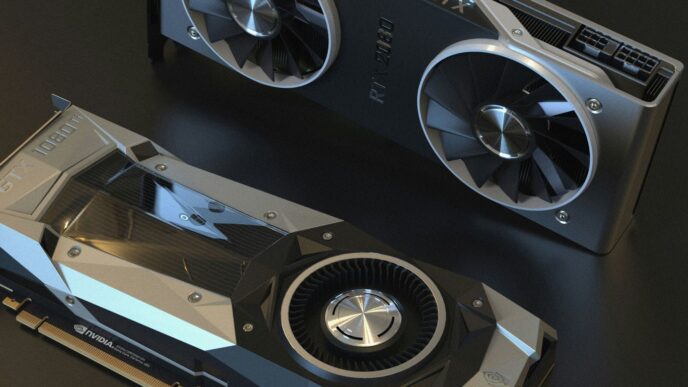
NVIDIA makes a card called the "Founders Edition." It’s their own design, usually pretty sleek and well-built. Think of it as the baseline, the standard. Then you have all the other companies – like ASUS, MSI, Gigabyte, and others. They take the NVIDIA chip and build their own cards around it. These are the "custom board designs." They might have different coolers, beefier power delivery, and sometimes even factory overclocks to squeeze out a bit more speed right out of the box. It’s worth checking out reviews for specific models because performance and noise levels can vary a lot. If you’re looking for a good overview of what’s out there, this guide on choosing an Nvidia GeForce RTX 40 series card can be helpful.
Cooling Solutions and Overclocking Potential
This is where custom cards really shine, or sometimes, fall flat. The cooler is super important for keeping the 4090 from getting too hot, especially if you plan on pushing it further. Some cards have massive heatsinks with three fans, others might have a more compact design. The better the cooling, the more likely you are to achieve stable overclocks. Overclocking means manually increasing the card’s speed beyond its factory settings. It’s not for everyone, and it can increase power draw and noise, but for some folks, getting that extra bit of performance is the goal. If you’re really focused on keeping things cool and quiet, looking at cards with excellent thermal management is a smart move.
Where to Find Specific RTX 4090 Models
Finding the exact card you want can sometimes be a treasure hunt, especially with high-demand items like the 4090. Here’s a quick rundown of what to expect:
- Founders Edition: Usually available directly from NVIDIA or select retailers. They tend to sell out fast.
- Custom Models: These are available from a wide range of electronics retailers. Keep an eye on major online stores and your local computer shops.
- Availability: Stock levels can fluctuate wildly. It’s a good idea to set up stock alerts if you have a specific model in mind.
- Pricing: Expect prices to vary. Custom cards often cost more than the Founders Edition, especially premium models with advanced cooling and RGB lighting.
So, Is It Worth It?
Alright, so we’ve talked a lot about the RTX 4090. It’s a beast, no doubt about it. If you’re looking for the absolute best performance for gaming, especially at high resolutions like 4K or even 8K, this card is pretty much the top dog right now. It can handle pretty much anything you throw at it, from the latest games at max settings to demanding creative work. But let’s be real, it’s not cheap. You’re paying a premium for that top-tier power. So, if you’re a casual gamer or on a tighter budget, there are probably better options out there that won’t break the bank. But if you want the ultimate experience and have the cash to spend, the RTX 4090 is definitely something to consider.
Frequently Asked Questions
What makes the RTX 4090 so powerful for gaming?
The RTX 4090 is a beast because it has a super-advanced chip called the Ada Lovelace architecture. This makes it way faster at drawing pictures on your screen, especially for games that look really real with fancy lighting effects. It’s like having the fastest race car for your computer’s graphics.
Can this graphics card handle playing games on a 4K or even 8K screen?
Absolutely! The RTX 4090 is built for super-sharp screens. It can easily handle games at 4K resolution, making everything look incredibly clear. It can even push games to 8K, which is like four times sharper than 4K, though you might need to adjust some settings for the smoothest experience.
Does the RTX 4090 use a lot of electricity?
It does use more power than older cards because it’s so powerful. When you’re playing demanding games, it will draw more electricity. However, when you’re just browsing the web or watching videos, it doesn’t use nearly as much. Think of it like a sports car – it guzzles gas when you floor it, but sips it when you’re cruising.
What is DLSS, and how does it help with games?
DLSS stands for Deep Learning Super Sampling. It’s a smart technology that uses AI to make games run faster without making them look blurry. It basically draws the game at a lower resolution and then uses AI to upscale it to your screen’s resolution, giving you better frame rates, which means smoother gameplay.
Is the RTX 4090 good for things other than gaming, like video editing?
Yes, definitely! The RTX 4090 isn’t just for games. Its raw power and special cores help speed up demanding tasks like editing videos, creating 3D models, and doing complex design work. It can make these jobs finish much faster, saving you a lot of time.
What’s the difference between different brands of RTX 4090 cards?
While all RTX 4090 cards use the same main chip, different companies make their own versions. These can have different cooling systems to keep them from getting too hot, look cooler, and sometimes even be designed to run a bit faster right out of the box. Some are built for quiet operation, while others focus on maximum speed.