Thinking about getting the Xbox Series S digital? It’s a popular choice for a reason, but there’s a lot to consider before you hand over your cash. This console is all about digital games, meaning no discs allowed. So, if you’re used to buying physical copies or have a big collection of old Xbox games on disc, you’ll need to adjust. We’re going to break down what the Xbox Series S digital really is, what it can do, and if it’s the right fit for your gaming setup. Let’s get into it.
Key Takeaways
- The Xbox Series S is a digital-only console, meaning it doesn’t have a disc drive. All your games will be downloaded.
- It offers next-gen gaming features like faster load times and Quick Resume, allowing you to switch between games easily.
- You can play thousands of games, including Xbox One titles, thanks to backward compatibility. Smart Delivery ensures you always play the best version of a game you own.
- While smaller and less powerful than the Series X, it’s a more affordable entry point into current-gen gaming, targeting 1440p resolution.
- It uses a custom SSD for quick loading and supports expandable storage, but you’ll need to buy accessories like controllers and storage cards separately.
Understanding The Xbox Series S Digital
What Is The Xbox Series S Digital?
The Xbox Series S is a digital-only console, meaning it doesn’t have a disc drive. This makes it a more compact and often more affordable way to jump into the latest generation of gaming. It’s designed for players who are comfortable with a digital game library and want a streamlined gaming experience. Think of it as your gateway to next-gen games without the need for physical media. It launched on November 10, 2020, and has been a popular choice for many.
Key Features Of The Xbox Series S
This console packs a punch for its size. Here are some of the standout features:
- Next-Gen Performance: It utilizes the Xbox Velocity Architecture for faster loading times and smoother gameplay, supporting frame rates up to 120 FPS.
- Quick Resume: Jump between multiple games quickly without losing your progress. You can pause one game and pick up another right where you left off.
- All-Digital: As mentioned, there’s no disc drive. All your games are digital downloads, managed through your Xbox account.
- Backward Compatibility: Play thousands of games from previous Xbox generations, including Xbox One, Xbox 360, and original Xbox titles.
- Compact Design: It’s significantly smaller than its bigger sibling, the Xbox Series X, making it easy to fit into almost any entertainment setup.
Xbox Series S Launch Details
When the Xbox Series S first hit the shelves, it was positioned as a more accessible entry point into next-generation gaming. It was released alongside the Xbox Series X on November 10, 2020. The focus was on providing a powerful, modern gaming experience in a smaller, digital-first package. This allowed players to access a vast library of digital titles and services like Xbox Game Pass right out of the box, without the need for physical discs. It was a clear signal from Microsoft about the future of gaming being increasingly digital.
Gaming Performance And Capabilities
So, how does the Xbox Series S actually perform when you fire up a game? It’s designed to give you that next-gen feel without breaking the bank, and for the most part, it does a pretty good job. You’re looking at games running at up to 1440p resolution, with a target of hitting 120 frames per second in some titles. That means smoother motion and a more responsive feel, especially in fast-paced games. It’s a noticeable step up from older consoles.
Next-Generation Gaming Experience
What does "next-gen" even mean for the Series S? Well, it’s a combination of things. You get significantly faster loading times thanks to the custom NVMe SSD. Seriously, waiting around for games to boot up is way less of a thing now. Plus, features like Quick Resume let you jump back into your game exactly where you left off, even if you switch to another game or turn the console off. It really changes how you play, letting you hop between different adventures without losing your progress. It’s all about getting you into the action faster and keeping you there.
Optimized Gaming Performance
Microsoft has put a lot of effort into making sure games run well on the Series S. Games specifically built or updated for the Xbox Series X|S consoles will show off the best of what this machine can do. This includes those super-quick load times and better responsiveness. The console uses what’s called the Xbox Velocity Architecture, which is basically a fancy way of saying it’s built from the ground up to make games load fast and run smoothly. You can check out some of the CPU benchmarks if you’re curious about the nitty-gritty details.
Visual Fidelity And Audio Immersion
While the Series S targets 1440p, it still packs some impressive visual tech. High Dynamic Range (HDR) support means you get more vibrant colors and better contrast, making games look more lifelike. On the audio side, the Series S supports advanced sound technologies like Dolby Digital 5.1 and DTS 5.1, and even Dolby TrueHD with Atmos. This means you can get really immersed in the game’s world, hearing exactly where sounds are coming from. It’s not just about how games look, but how they sound too, pulling you deeper into the experience.
Game Library And Compatibility
Accessing Your Digital Game Library
The Xbox Series S is an all-digital console, which means you won’t be popping any discs into it. All your games will be digital downloads. This is where Xbox Game Pass really shines. Think of it as a massive digital library you can access. You can buy games directly from the Microsoft Store, and they’re yours to keep. Plus, with Xbox Game Pass, you get access to hundreds of games, including brand new releases on day one, without having to buy each one individually. It’s a pretty sweet deal if you play a lot of different titles.
Playing Xbox One Games
Good news here! The Xbox Series S is designed to play almost all of your existing Xbox One games. You just need to make sure you own them digitally. If you bought games digitally on your Xbox One, they’ll be available to download and play on your Series S. Load times are going to be way faster, and you might even see some visual improvements thanks to the console’s power. It’s a nice way to keep playing the games you already love without missing a beat.
Backward Compatibility With Older Generations
This is where things get really interesting. The Xbox Series S isn’t just about playing Xbox One games. It also supports a huge chunk of games from the original Xbox and the Xbox 360. We’re talking thousands of titles here. So, if you have a backlog of older games you never finished or want to revisit, there’s a good chance you can play them on the Series S. Microsoft has put a lot of work into making sure these older games run better, too, with faster loading and more stable performance. It’s like a time machine for your favorite classic games, but with modern upgrades.
Hardware Specifications And Design
Processor And Graphics Power
The Xbox Series S packs a custom Zen 2 CPU with 8 cores running at 3.8 GHz (or 3.6 GHz with Simultaneous Multithreading enabled). This is the brainpower behind the console, handling all the game logic and system processes. For graphics, it utilizes a custom RDNA 2 GPU. This graphics unit can churn out 4 Teraflops of processing power, with 20 Compute Units running at 1.565 GHz. While it’s not the same powerhouse as the Series X, it’s more than capable of running games at a target resolution of 1440p, and can even push up to 120 frames per second in some titles. This means smoother gameplay and a more responsive feel, especially in fast-paced games. Plus, it supports features like Auto Low Latency Mode, HDMI Variable Refresh Rate, and AMD FreeSync, which all work together to reduce input lag and screen tearing for a better visual experience.
Memory And Storage Options
When it comes to memory, the Series S comes with 10GB of GDDR6 RAM. This memory is split, with 8GB running at a faster speed (224 GB/s) for the GPU and 2GB at a slower speed (56 GB/s) for the operating system and other background tasks. This setup helps keep things running smoothly. For storage, the console uses a custom NVMe SSD, which is a big deal for loading times. You’ll find different storage options available:
- 512GB SSD: This is the standard option for the Robot White model.
- 1TB SSD: Available in both Robot White and the Carbon Black colorway.
These SSDs are seriously fast, offering raw read speeds of 2.4 GB/s and compressed speeds of up to 4.8 GB/s thanks to a dedicated decompression block. This means games load way quicker than on older consoles. If you need more space, you can add official Xbox Series X|S Storage Expansion Cards, which match the internal SSD’s performance, or use an external USB 3.1 HDD for older games or media storage.
Console Dimensions And Weight
The Xbox Series S is designed to be compact and unobtrusive. It’s significantly smaller than the Xbox Series X, making it a great choice if you’re tight on space or just prefer a sleeker look. It’s primarily finished in a clean ‘Robot White’ color, though a ‘Carbon Black’ 1TB version is also available. The console is designed to stand vertically or horizontally, offering flexibility in how you set up your entertainment center. Its lightweight design also makes it easy to move around if needed. While exact dimensions can vary slightly, it’s roughly 6.5 x 2.75 x 15 inches (16.5 x 7 x 38 cm) and weighs around 4.25 pounds (1.9 kg), making it one of the smallest Xbox consoles ever made.
Accessories And Ecosystem
So, you’ve got your shiny new Xbox Series S, but what else do you need to really get the most out of it? Let’s talk accessories and how everything fits together. It’s not just about the console itself; the ecosystem around it makes a big difference.
Controller Compatibility
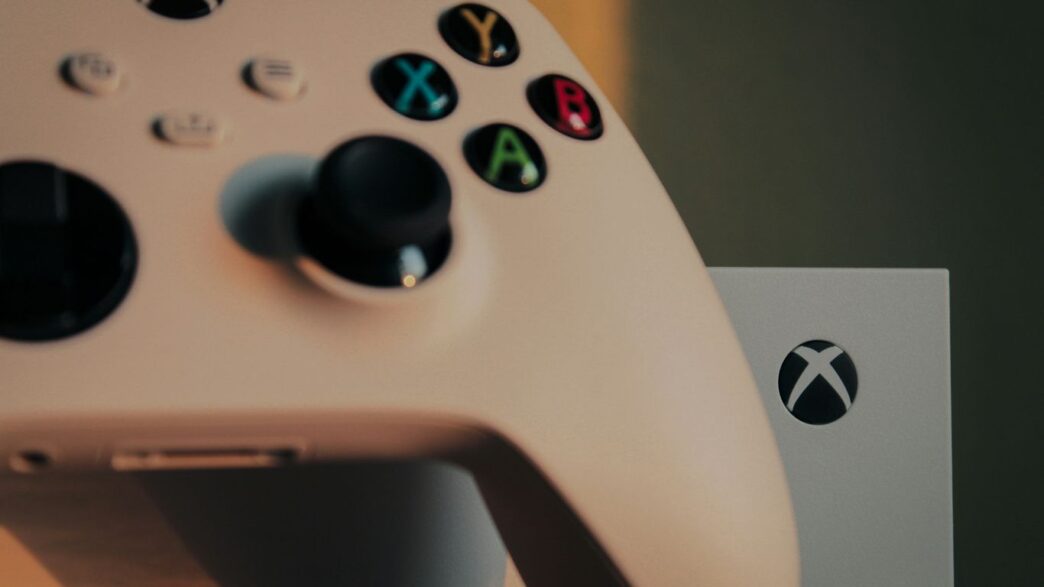
The Xbox Wireless Controller that comes with the Series S is pretty slick. It’s got that textured grip on the triggers and bumpers, which is a nice touch when things get intense in-game. The hybrid D-pad is also a solid improvement for fighting games or anything requiring precise directional inputs. But here’s the good news: if you’re upgrading from an Xbox One, you can bring your old controllers along for the ride. That means you don’t have to start your accessory collection from scratch. Pretty convenient, right?
Storage Expansion Options
This is a big one, especially since the Series S is an all-digital console. Games are getting bigger, and that built-in storage can fill up faster than you’d think. You’ve got a couple of ways to go:
- Internal Storage Expansion Card: These cards are designed to match the speed of the console’s internal SSD. Think of it as adding more of that super-fast storage. They come in different sizes, so you can pick what works best for your game library.
- External USB 3.1 HDD: You can also use an external hard drive, but it’s important to know that while you can store Series S games on it, you can’t play them directly from it. You’d have to move them back to the console’s internal storage or an expansion card to play. However, you can store and play older Xbox One, Xbox 360, and original Xbox games directly from these external drives.
Essential Accessories For The Xbox Series S
Beyond controllers and storage, there are a few other things that can really round out your setup:
- Xbox Wireless Headset: If you’re into multiplayer or just want to immerse yourself in game audio without disturbing others, a good headset is a must. The official Xbox Wireless Headset connects easily and offers clear sound.
- Streaming Services: While not a physical accessory, remember the Series S is also a 4K media player. Apps like Netflix, Disney+, Amazon Prime Video, and Hulu are all available, so you can stream your favorite shows and movies in high definition.
- Xbox Game Pass: This isn’t exactly an accessory, but it’s a huge part of the Xbox ecosystem. For a monthly fee, you get access to a massive library of games, including brand-new titles on day one. It’s a fantastic way to discover new games without buying each one individually.
Making The Purchase Decision

So, you’re thinking about grabbing an Xbox Series S, but maybe you’re wondering if it’s the right move for you. It’s a pretty common question, especially when you see its bigger sibling, the Xbox Series X, out there. Let’s break down what you get and how it stacks up.
Xbox Series S vs. Xbox Series X
This is probably the biggest question on everyone’s mind. The Series S is the all-digital, more compact, and generally less expensive option. It’s designed for 1440p gaming, though it can do 4K upscaling, and it’s a fantastic entry point into the current generation of gaming. The Series X, on the other hand, is the powerhouse. It targets native 4K gaming, has a more robust internal storage, and includes a disc drive for those who still like physical media. If you’re looking for the absolute best graphical fidelity and don’t mind the higher price tag, the Series X is the way to go. But for many, the Series S offers a really solid next-gen experience without breaking the bank.
Here’s a quick look at some key differences:
| Feature | Xbox Series S | Xbox Series X |
|---|---|---|
| Target Resolution | 1440p (upscales to 4K) | Native 4K |
| Disc Drive | No | Yes |
| Internal Storage | 512GB / 1TB | 1TB |
| Physical Size | Smaller, lighter | Larger, heavier |
| Price (approx.) | Lower | Higher |
Included Components In The Bundle
When you pick up an Xbox Series S, what exactly comes in the box? It’s pretty straightforward. You’ll get the console itself, of course. The standard model usually comes with a 512GB SSD, though you can find versions with 1TB storage now, often in different colors like Carbon Black. You also get the Xbox Wireless Controller, typically in Robot White to match the console. A power cable and an HDMI cable are included too, so you’re pretty much ready to go right out of the box. It’s a pretty clean setup, honestly.
Pricing and Availability
Pricing can shift a bit, especially with sales and bundles. The Xbox Series S has always been positioned as the more budget-friendly option. You can often find it for around $299 USD for the 512GB model, with the 1TB versions costing a bit more. Keep an eye out for deals, as Microsoft and retailers sometimes offer discounts, like $50 off, making it an even more attractive purchase. It’s widely available at major electronics retailers and directly from the Microsoft Store. Given the value it provides, it’s a popular choice, so checking availability is always a good idea if you’re set on getting one soon. Remember, it’s an all-digital console, so factor in that you’ll be buying games digitally or using services like Game Pass.
So, Should You Get the Xbox Series S?
Alright, so we’ve gone over a lot about the Xbox Series S. It’s a pretty neat little box, especially if you’re all about digital games and don’t need the absolute top-tier 4K visuals. It’s a solid way to jump into the next generation of gaming without breaking the bank. You can play tons of games, including older ones, and it’s got some cool features like Quick Resume. Just remember, it’s all digital – no discs allowed. If that works for you, and you’re looking for a budget-friendly entry into current-gen gaming, the Series S is definitely worth a look. It’s a good deal for what you get.
Frequently Asked Questions
When did the Xbox Series S come out?
The Xbox Series S was released on November 10, 2020. You can grab one right now if you’re looking to upgrade your gaming setup.
Can I play physical game discs on the Xbox Series S?
No, the Xbox Series S is an all-digital console. This means it doesn’t have a disc drive, so you can only play games you download from the internet.
What games can I play on the Xbox Series S?
You can play thousands of games on the Xbox Series S! It works with games from Xbox One, and even older Xbox consoles. Plus, with something called ‘Smart Delivery,’ you buy a digital game once, and you always get the best version for the console you’re using.
Will my old Xbox One controllers work with the Series S?
Yes, most of your Xbox One controllers and accessories will work just fine with the Xbox Series S. So, you don’t have to buy new ones if you already have some you like.
What comes in the box with the Xbox Series S?
When you buy an Xbox Series S, you’ll get the console itself, a controller, an Ultra High Speed HDMI cable, and a power cord. You can buy other things like Game Pass or storage cards separately to make your experience even better.
Is the Xbox Series S a ‘next-gen’ console?
Absolutely! The Xbox Series S is a next-generation console. It uses special technology called the Xbox Velocity Architecture to make games load faster, let you switch between games quickly, and create more detailed game worlds with smoother action.